
AI features
PwrGit can hand three small jobs to an agent: drafting a commit message, drafting a squash message, and proposing a Tidy plan that regroups selected commits. All three are off by default, switched on per profile, and run on the Codex CLI you already have, signed in to your own account.
PwrGit has no AI service of its own. It holds no provider key, and there is no PwrDrvr server in the path.
Everything else in PwrGit works with AI off. Squash and Reorder in particular need no agent — see Changes → Squash and reorder.
Turn it on
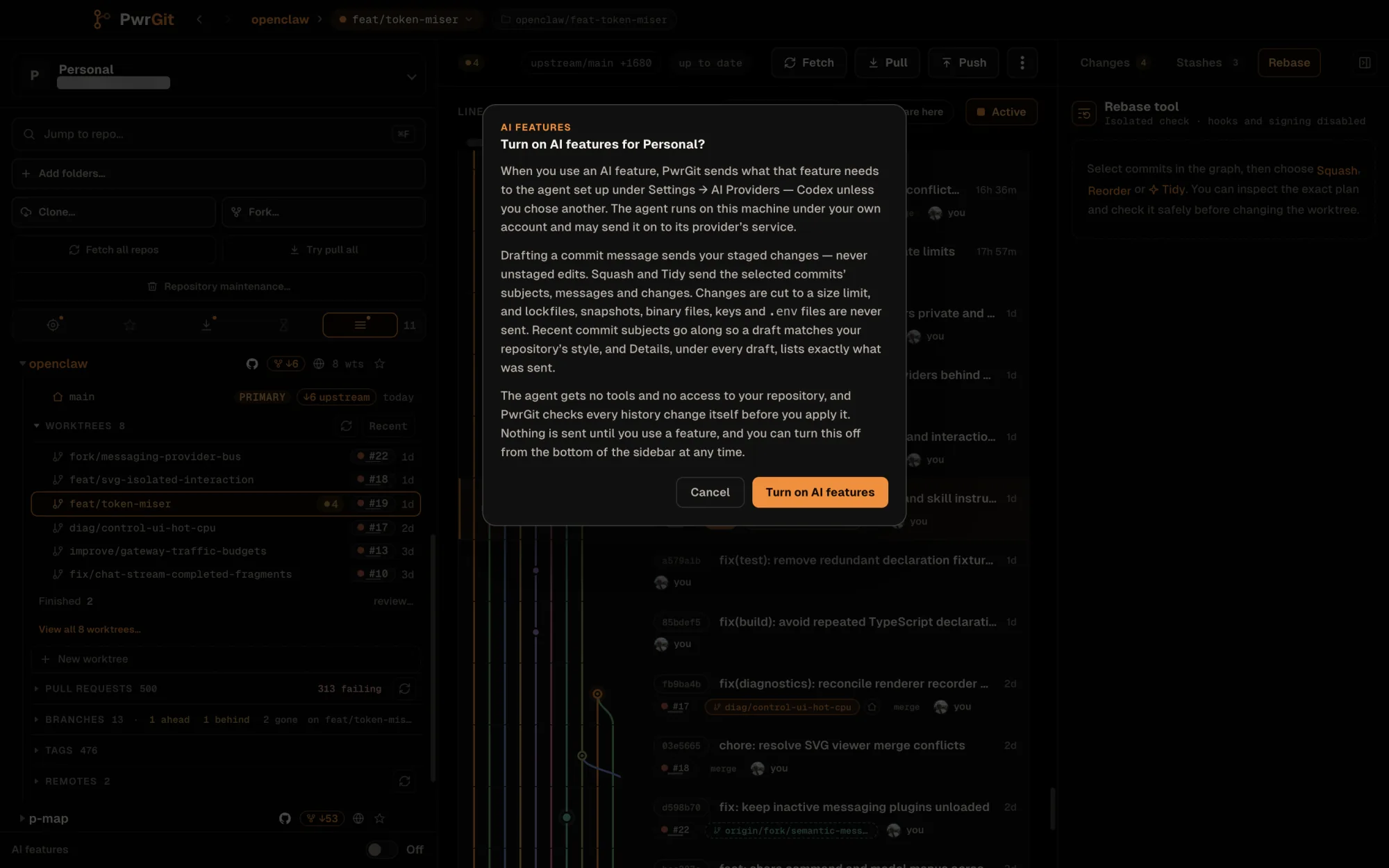
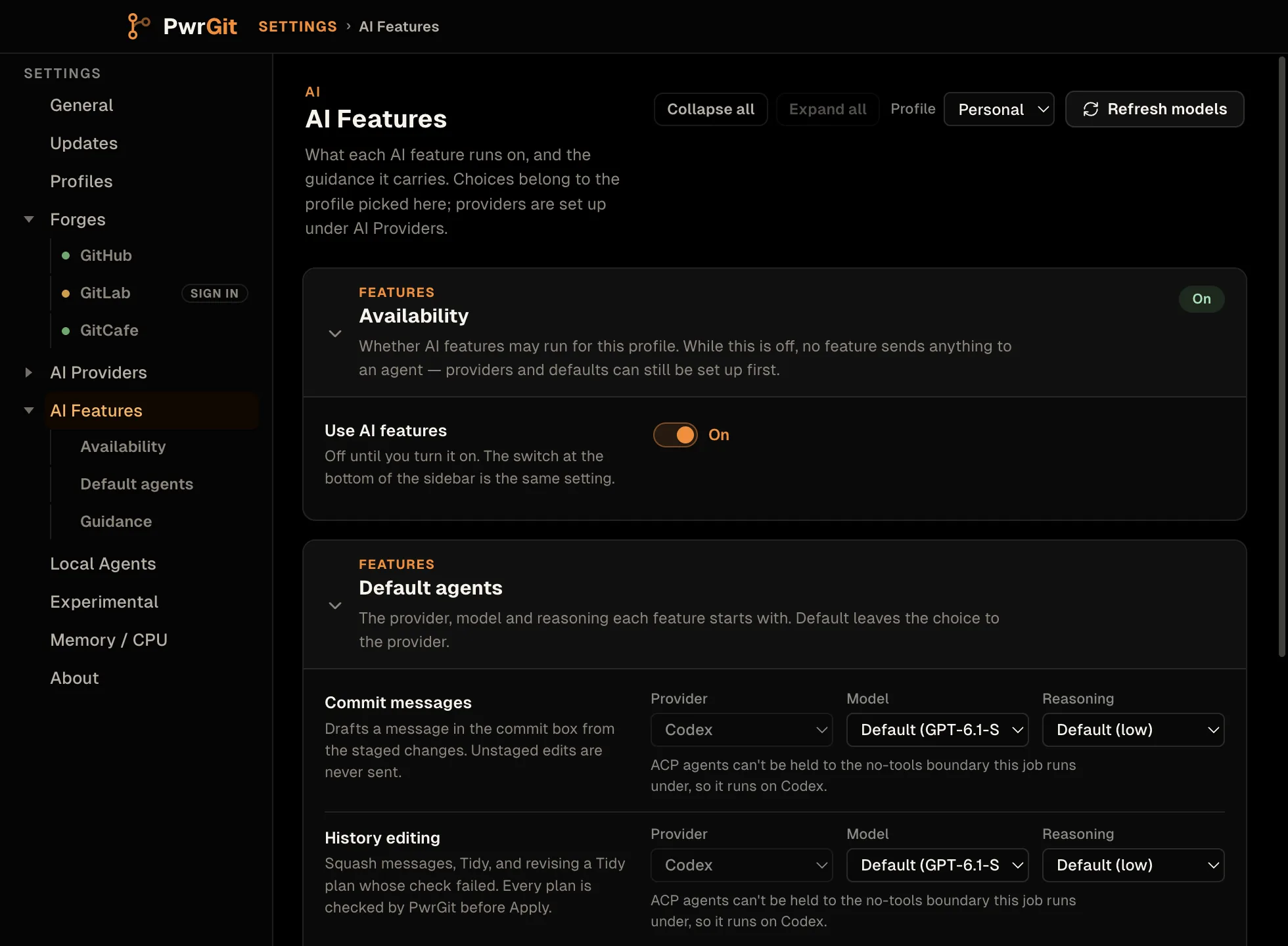
The switch is at the bottom of the sidebar: AI features, labelled AI features for profile for screen readers. The same setting is Settings → AI Features → Availability → Use AI features.
The first time you turn it on for a profile, PwrGit shows a disclosure — Turn on AI features for profile? — saying what is sent and when. Cancel is the default button; Turn on AI features confirms.
If Codex cannot run yet — not installed, or not signed in — the switch opens Settings → AI Providers at the Codex card instead of turning on.
It is per profile. Turning it on for Work does nothing
for Personal. While a profile’s switch is off, no feature
sends anything to an agent: the commit box has no draft
controls, the selection bar offers no Tidy…, and the agent
chip in the rebase tool reads AI off.
Providers
Settings → AI Providers lists the agents PwrGit can hand work to, one card per provider, each with a status: Ready, Sign in, Update recommended, Not found, and so on. Re-check at the top runs discovery again.
Codex runs every AI feature today. Its card has:
| Field | What it does |
|---|---|
| Selection | Newest found (default) follows the newest usable Codex on the machine; Specified path pins one binary |
| Installs | Every Codex found, with Use to pick one |
| Custom path | A Codex binary discovery does not find |
| Account | Which Codex sign-in this profile uses. Follow profile (default) picks a Codex profile with the same name as this PwrGit profile when one is signed in |
| Sign in… | Starts Codex’s own sign-in in your browser |
The page also lists ACP agents — Grok, Kimi Code CLI and Qwen Code — each with Use in PwrGit, its installs, a custom path, and Check session. You can set one up, but no current feature runs on an ACP agent: both jobs run with no tools, and an ACP agent cannot be held to that, so a feature set to one runs on Codex. The Features rows say so beside the provider picker.
Older Codex installs
Codex older than 0.159.2 may not list or run the newest
models. When the Codex a profile runs is older than that, the
Codex card reads Update recommended and shows the update
command for the way it was installed — brew upgrade --cask
codex, npm install -g @openai/codex@latest, and so on — with
Copy command. A Codex supplied by an app is updated with that
app’s own updater.
A profile with AI features on also gets a notice at startup, with AI Providers and Dismiss. Dismissing lasts until the next launch. After updating, switch back to PwrGit; it checks again.
Models and reasoning
Settings → AI Features → Default agents has one row per job, each with Provider, Model and Reasoning:
| Job | Covers |
|---|---|
| Commit messages | Drafts from staged changes |
| History editing | Squash messages, Tidy, and revising a Tidy plan whose check failed |
Default leaves the choice to Codex. A commit message draft runs at low reasoning unless you choose otherwise, a Tidy plan at medium. Refresh models re-reads Codex’s model list after an upgrade.
The chip at the top of the rebase tool overrides model and reasoning for one request; it never changes the provider.
Guidance is free text added to every feature’s instructions — tone, what to emphasize, what to leave out. It steers; it never gives a feature a permission it lacks.
Commit message drafts
With AI on, the commit box in the Changes tab gets a footer with Draft. It reads your staged changes — never unstaged edits — and fills the message box.
- A draft never overwrites what you typed. If you have already typed, it waits behind Use draft, with Compare to read it first. Replacing is one step, and Undo puts your text back.
- Regenerate asks again; Cancel stops a draft in flight.
- Details under every draft lists exactly what was sent: each file and how many of its lines, what was held back and why, and the line budget.
Squash message drafts
Select commits in the graph and choose Squash. The message box starts as Git’s joined subjects; with AI on, PwrGit asks for a draft straight away and shows it the same way — Use draft, Compare, Undo, Details. The squash itself is the same deterministic operation as with AI off.
Tidy history plans
Select commits in the graph and choose Tidy… on the selection bar. Codex reads the selected commits and returns a Proposed history: which commits fold into which, in what order, with new messages. You can split a commit back into its own group with Keep separate (and Fold back), and Edit any group’s message before checking.
Then the same safety path every history edit in PwrGit takes:
- Check in isolated copy. PwrGit replays the plan in a scratch copy, not your worktree, and proves three things: every selected commit is used exactly once, the replay is clean, and the final file tree is identical to the tip you started from.
- A plan that changes the code is blocked. The check reads Blocked — “The rewrite would change the code, not just the history.” — with Show files listing what would differ. Ask Codex for another plan sends the failure back for a revision, at most twice.
- Applying is your choice. Apply n commits (or Apply revised plan) is enabled only after a clean check. Nothing is pushed.
Hooks, signing and rerere are disabled for both check and apply, as for Squash and Reorder.
What is sent, and what never happens
PwrGit sends a feature what it needs, to the agent you set up, and nothing else:
| Feature | Sent |
|---|---|
| Commit message | Staged changes |
| Squash, Tidy | The selected commits’ subjects, messages and changes |
| All of them | The 20 most recent commit subjects, as a style sample |
- Changes are cut to a 2,000-line budget. Lockfiles,
snapshots, binary files, keys and
.envfiles are never sent;.env.exampleand similar templates can be. - The agent gets no tools and no repository path. Codex runs in a scratch workspace outside every repository, in a read-only sandbox. Commit text and diffs go in as data, and instructions inside them are ignored.
- Nothing goes to PwrDrvr. There is no PwrDrvr server and no PwrDrvr key. Codex runs on your machine under your own account, and may send what it receives on to its provider’s service, as it does whenever you use it.
- Nothing is sent until you use a feature. Turning the switch on sends nothing.
- An agent never changes Git. It returns a draft or a plan. Every history change goes through PwrGit’s own check and your Apply.
Troubleshooting
| Symptom | Cause |
|---|---|
| No Draft in the commit box, no Tidy… on the selection bar | AI features are off for this profile — the chip reads AI off |
| Chip reads No agent | Codex is not found or not signed in — open Settings → AI Providers |
| “Codex is not signed in for …” | The Codex account this profile follows is signed out — Sign in… on the Codex card |
| “Codex could not load its configuration before generating the message” | Codex failed to load the configuration for the account selected in AI Providers. Check that account’s Codex configuration |
| “Codex did not finish the plan in time” | The request timed out. Retry, or choose a faster model or lower reasoning on the chip |
| A model you expect is missing | Codex is older than 0.159.2 — see Older Codex installs, then Refresh models |
| A Tidy check reads Blocked | The plan would change the final tree. Ask Codex for another plan, or use Squash and Reorder yourself |
Every failure ends with “Nothing changed.” Hover the failure message for the original diagnostic from Codex; it is also in Logs (see Sync → Logs).
Not yet
- No feature runs on an ACP agent. They can be set up under AI Providers, but both jobs require an agent that runs with no tools.
- No pull request descriptions. The three jobs above are all there is.