
Settings
Command+, (Ctrl+,) opens Settings. On macOS it is also under the PwrGit menu; on Windows and Linux it is at the top of the File menu. One Settings window serves every profile.
Ten panes: General, Updates, Profiles, Forges, AI Providers, AI Features, Local Agents, Experimental, Memory / CPU, and About. Forges, AI Providers and AI Features expand in the left column into one row per card, each carrying that card’s live status, so you can see what is installed and working without opening anything. Every pane’s cards fold; Collapse all / Expand all sit in the pane head.
The defaults are the recommendation — each “why you might change it” below is the rarer case.
General
Color theme
System, Dark or Light. System follows the operating system’s appearance while PwrGit runs. A profile can pin its own palette instead (see Profiles); profiles left on App setting follow this one.
Sidebar
Two independent axes.
Text size — XS (11px), S (12px), M (13px), L (14px), XL (15px). It scales the repository names in the sidebar, with worktree branches one step down. Counts, tags and section labels deliberately hold still, so a larger size reads as bigger names rather than as zooming the whole app.
Density — Comfortable or Compact. Controls row padding and the gaps between repositories. It is independent of text size; Compact with a large text size is a perfectly good combination.
Search scope
Search all profiles — off. The command palette (Command+K / Ctrl+K) searches the current profile. Turn this on to find repositories, branches and change requests in your other profiles too; each result names its profile, and picking one opens that profile’s window rather than changing this one. The palette’s own This profile / All profiles control sets the same thing.
Developer mode
Off. Turning it on exposes Reload, Force Reload and Developer Tools in the View menu, and enables their shortcuts (Command+R, Shift+Command+R, Option+Command+I; on Windows and Linux Ctrl+R, Shift+Ctrl+R, Shift+Ctrl+I). It takes effect immediately in every window.
Leave it off unless you are debugging the app itself — the shortcuts are easy to hit by accident, and reloading mid-operation is not useful.
Git runtime
The Git runtime card in General. PwrGit runs its own bundled Git and Git LFS, so repository operations do not depend on what is installed on the machine — and work on a machine with no Git at all. Every repository command, the SSH trust checks, and the standalone MCP server use the same runtime.
The card’s chip says which one is in use: Bundled, Installed, or Unavailable if the Git in use cannot run — the state where no repository operation can.
| Row | Shows |
|---|---|
| Git | The version and path of the Git PwrGit runs |
| Git LFS | The LFS version that Git runs, or Not found |
| HTTPS sign-in | macOS, bundled Git only: the keychain helper it borrows |
| Installs | The bundled Git plus every Git found on this machine |
| Custom path | A Git the list does not find, by full path |
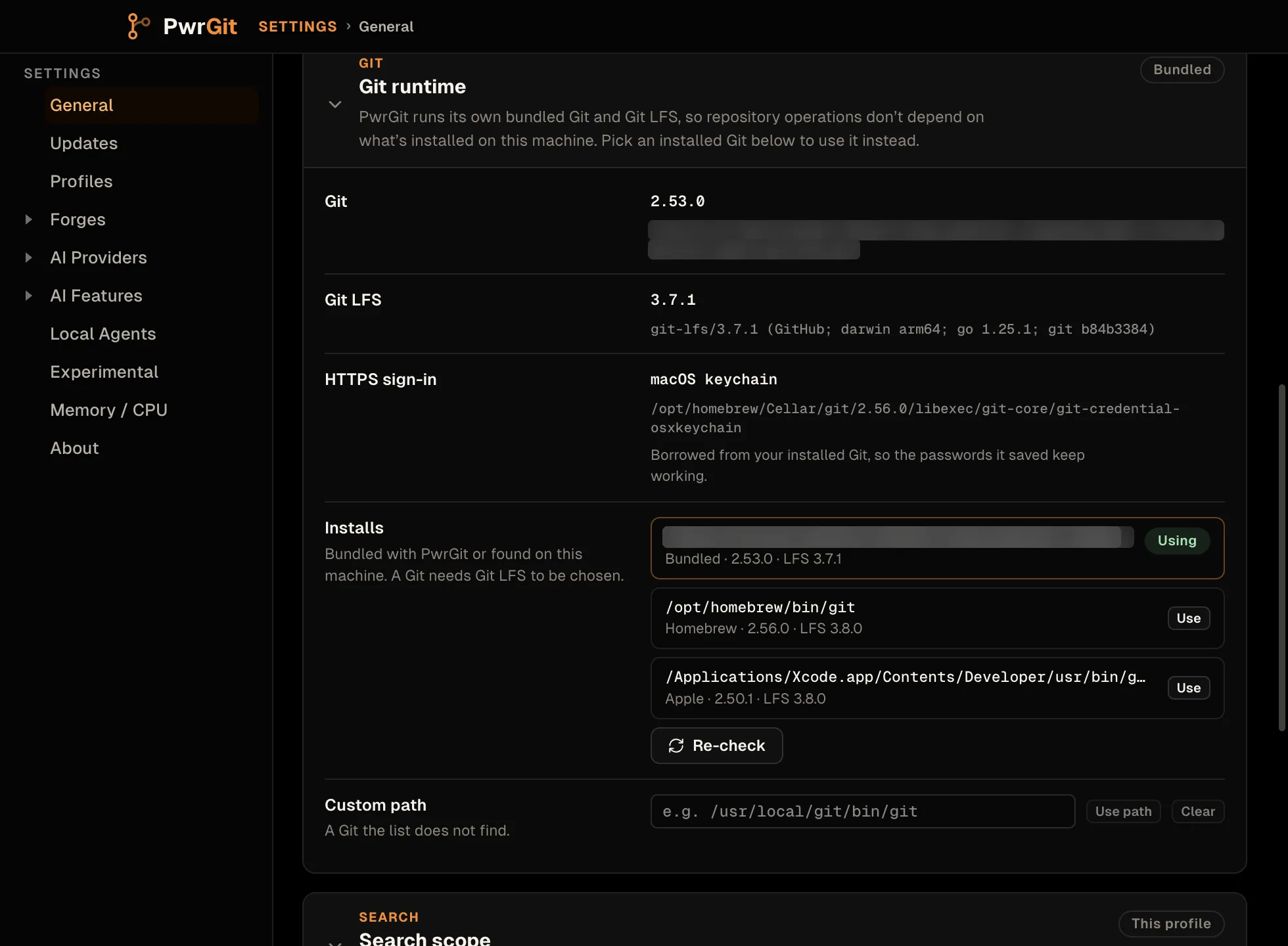
What the bundled Git brings with it
The bundle is set up the way an installed Git and Git LFS would
be. PwrGit writes it a system-level config of its own (under
git/ in the data folder) with:
- The Git LFS filter, exactly as
git lfs install --systemwrites it. LFS repositories check out real file contents, not pointer files, without you runninggit lfs installfirst. - On macOS, your installed Git’s keychain helper. PwrGit finds
the
git-credential-osxkeychainthat belongs to the Git you run in a terminal — Homebrew’s ahead of Apple’s — and uses it, so the HTTPS passwords and tokens that Git already saved keep working without a new keychain prompt. If no installed Git with a keychain helper is found, the row reads No keychain helper: install Git from Homebrew or the Xcode Command Line Tools, or use an SSH remote. - On Windows, the bundle is a self-contained Git for Windows that includes Git Credential Manager.
- On Linux, no credential helper is configured by default.
It is system scope, so your global and repository config still
win: a credential.helper in ~/.gitconfig still runs, and
git lfs install --skip-smudge still keeps pointers.
PwrGit runs Git non-interactively everywhere. Git never opens a
terminal prompt, and a credential manager never opens a sign-in
window on its behalf. A credential that is missing fails the
operation; for GitHub over HTTPS, PwrGit then offers to test SSH
instead (see HTTPS authentication failures).
SSH remotes use your own ~/.ssh/config and agent.
Switching to an installed Git
Installs lists every Git PwrGit found — Homebrew’s and the
one behind Apple’s developer tools on macOS, ~/.local/bin/git and
~/bin/git on macOS and Linux, and the first git on your PATH
everywhere — each with its source, Git version and LFS version. Use switches to that Git;
Use on the bundled row switches back. Apple’s /usr/bin/git
shim is never run while looking: without developer tools it opens
their installer.
A Git needs working Git LFS to be chosen. One without it is still listed, marked LFS missing, so its absence is explained rather than mysterious. Others are marked Not found or Didn’t run. Custom path takes any Git by full path, checks it the same way before saving, and Re-check probes again after you install or upgrade something.
Why you might switch:
- You rely on configuration only your installed Git reads — its
own system config, a credential helper set there, a custom
core.hooksPathtoolchain that expects a particular Git. - You need a newer Git than the bundle, or a build with site-specific patches.
- You want the Git in PwrGit and the Git in your terminal to be the same binary while you chase a difference between them.
An installed Git runs with its own environment — none of the bundle’s config or helpers. A chosen Git never falls back: if it later breaks or disappears, every operation fails with a message naming it, rather than quietly running a different Git than Settings shows. Reinstalling PwrGit restores a broken bundle.
Updates
Release channel — four slots, Stable or Beta × Latest or Prerelease:
| Slot | Meaning |
|---|---|
| Stable · Latest | Smoke-checked. The default for everyone. |
| Stable · Prerelease | Release candidates for the stable line. |
| Beta · Latest | Beta builds off main. |
| Beta · Prerelease | The newest build of anything: alphas and betas off main, and Stable release candidates or a staged Stable release while they are ahead of Stable · Latest. A newer alpha or beta still wins. May not install. |
Each slot shows the version currently published there, marks the one that is Installed and the one that is Selected, and links to its release notes. Unavailable means nothing has been published there yet; Beta stays selectable regardless. Until you pick a slot, PwrGit follows the build you installed.
Check for Update asks immediately; PwrGit also checks on its
own. When a build has downloaded, a Restart to Update
(<version>) button appears here. On Linux, when an update
cannot install itself, this pane shows the terminal command to do
it with Copy update command.
Full detail, including how often PwrGit checks and the Linux install flow, in Install → Updates.
Profiles
Profiles are workspaces: each has its own window, theme, commit identity and repo folders. The pane lists every profile with its identity and folders. Add profile creates one; Edit… changes its name, author name, commit e-mail, folders and Window theme (App setting, Dark or Light); Open window brings up its window. The Profiles menu does the same from anywhere: New Profile… and Manage Profiles….
Delete… removes a profile after you type its name to confirm. That removes its commit identity, folder list, indexed records and profile-scoped selections from PwrGit, and closes its window. It deletes nothing on disk — no folders, repositories, worktrees, branches or commits. The last remaining profile cannot be deleted.
See Profiles for what a profile is and why the commit identity is applied the way it is.
Forges
One card per product — GitHub, GitLab and GitCafe — each reporting
Connected, Signed out, Off, or Not installed.
PwrGit reads through the CLI you already sign in with (gh,
glab, cafe); it never asks for a password and stores no token
of its own.
For a forge that is blocked, the card names the exact command that unblocks it. For a working one, it lists the hosts the CLI is signed in to — each with a switch for whether PwrGit reads status from it — and what that product supports, so a feature a forge cannot do reads as a known limit rather than as a bug. Add GitHub Enterprise… and Add GitLab instance… add a host you have not signed in to yet; PwrGit never guesses a product from a hostname.
This pane re-checks while it is open, so signing in from a terminal updates it without reopening. See Forges.
AI Providers
The agents PwrGit can hand work to, one card per provider: Codex, then the ACP agents Grok, Kimi Code CLI and Qwen Code. These settings belong to a profile — the picker in the pane head says which one you are editing. Nothing here turns AI on; that is AI Features → Availability.
Codex — PwrGit finds the Codex installs on the machine. Selection is Newest found (the default) or Specified path; Installs marks the binary the next job runs, and Custom path takes one discovery missed. Account picks the Codex sign-in this profile uses: Follow profile (a Codex profile with this PwrGit profile’s name, when one is signed in), System default, or a named Codex profile, with Sign in… beside it. An older Codex shows Update recommended and the command to update it for the installer it came from.
ACP agents — each is off until Use in PwrGit is on, with the same Installs / Custom path choice and a Check session button that starts the agent and asks for its models. Today both AI jobs run on Codex only, because an ACP agent cannot be held to the no-tools boundary they run under. An enabled ACP agent is set up, but no job runs on it.
Re-check probes again; nothing is probed until you open an AI pane. See AI features → Providers.
AI Features
Three cards, per profile.
Availability — Use AI features for <profile>, off.
It is the same setting as the AI features switch at the bottom
of the sidebar. The first time you turn it on for a profile,
PwrGit shows what will be sent and asks you to confirm. While it is
off, no feature sends anything to an agent; providers and defaults
can still be set up first.
Default agents — one row per job, each with Provider, Model and Reasoning:
| Job | What it does |
|---|---|
| Commit messages | Drafts a message in the commit box from the staged changes. Unstaged edits are never sent. |
| History editing | Squash messages, Tidy, and revising a Tidy plan whose check failed. Every plan is checked by PwrGit before Apply. |
Model lists what your Codex reports, and Default leaves the choice to the provider; Reasoning offers the efforts that model advertises. Refresh models re-reads both.
Guidance — free text added to every job’s instructions: tone, what to emphasize, what to leave out. Guidance steers a job; it never grants one a permission it lacks.
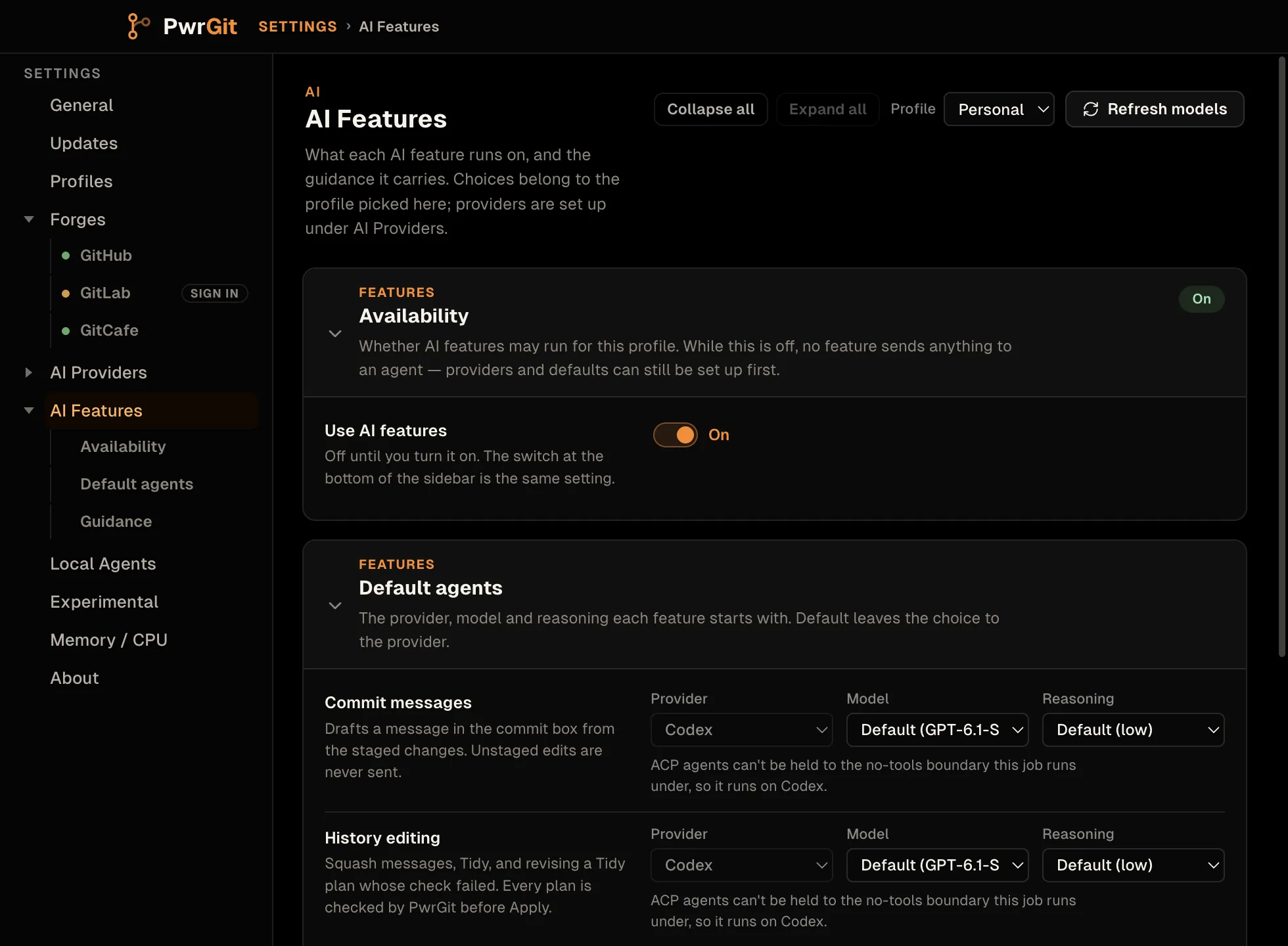
What is sent, what is never sent, and what the agent can and cannot do: AI features.
Local Agents
Authorization for PwrGit’s read-only MCP server, so an agent on this machine can read repository and worktree status.
Enable local-agent access — off. While off, PwrGit does not listen for MCP connections; saved Sessions and roles are kept. Turned on, Connect an agent shows the commands for Claude Code and Codex, each with a copy button. Running one opens PwrGit’s approval window, where you name the Session and choose its role; nothing is granted until you approve it.
Below that, the Authorization graph traces each Session to its role, that role’s permissions, and its repository boundary, and revokes a Session — which takes effect on a running agent. Custom roles are created and edited from the same pane: additive permissions, and either every reachable repository or only the roots you list.
Full walkthrough in MCP.
Experimental
Features that may change shape or be removed without notice.
Lineage Graph Scope → Default to all branches — off. Turning it on makes newly opened worktree views start in All branches instead of Active. The toggle in the graph header still overrides it per view either way.
Turn it on if you routinely work across many branches at once and find yourself flipping the scope every time. See Scope.
Memory / CPU
Diagnostic profiling. All of it is off, and all of it exists for chasing a performance problem — turn something on when someone asks you for a profile, and turn it back off afterwards.
Heap Monitor — samples the main process and every window’s heap on an interval, and captures a heap snapshot automatically when usage jumps by more than a growth threshold. Starts and stops live.
Hot Renderer CPU Profiling — watches each window’s CPU usage and captures a CPU profile of a renderer that stays above the trigger threshold. Arms and disarms live. Its controls:
- Start delay — wait before sampling begins, so you have time to stage the scenario you want profiled.
- Trigger mode — Spike fires on a single hot sample, Sustained needs consecutive hot samples, and Slow burn lowers the threshold to catch steady background churn.
- Heap snapshots during profiles — brackets each CPU profile with renderer heap snapshots. It turns itself off once a session reaches the Snapshot limit, because snapshots are large.
Startup CPU Profiling — profiles the main process and the first window from launch until shortly after first paint. Unlike the others this applies on the next launch, and stays on for every launch until you turn it off.
Output is written to a diagnostics folder in the application
data folder; the path in the pane head reveals it in your file
manager. The files open in Chrome DevTools.
About
This build — version (with a link to its release notes), the release channel the installed binary came from, build type, platform and runtime. Copy diagnostics identity copies exactly those facts for a bug report, and nothing else.
Resources and Help and reporting hold the documentation, website, source, issue tracker and private security-reporting addresses, each copyable for when a browser is not to hand. The Help menu opens the same places.
Attribution — PwrGit is released under the MIT License. Third-party notices covers the bundled npm packages, Electron, Git, Git LFS and Git Credential Manager. Both open from here, and from Help → View License and Help → Third-Party Notices.