
MCP
PwrGit runs a local MCP server inside the app. An agent connected to it can find your repositories and worktrees, read safe repository metadata and pull request, CI and review status, see which repositories you used most recently, and — if you allow it — open one in a PwrGit window.
Two things are true of it throughout, and the rest of this page follows from them:
- No Git writes. Nothing an agent can call commits, pushes, edits files, or changes a repository. No file contents, commit messages, author emails or remote credentials ever leave PwrGit.
- Nothing is granted until you approve it. Every connection goes through OAuth, and PwrGit issues a token only after you approve a named Session in its own approval window.
The server lives inside the installed app. There is nothing to clone, nothing to build, and no Node install to get right.
Turn on local agent access
Command+, (Ctrl+,) opens Settings. Go to Local Agents → MCP server and turn on Enable local-agent access. The section’s chip reads Listening once it is on, Off otherwise, and Failed if the listener could not start.
While it is on, PwrGit serves MCP at:
http://127.0.0.1:51731/mcp
It listens on the loopback address only, and accepts requests only for that exact host and port.
It is off by default. An always-listening local endpoint is a standing offer on every repository you have, so it is only ever on because you put it there. Once on, it stays on across restarts until you turn it off. Turning it off stops the listener and cancels every approval still waiting.
Connect an agent
With access on, Connect an agent in the same pane shows the command for each supported client, with Copy Claude Code command and Copy Codex CLI command.
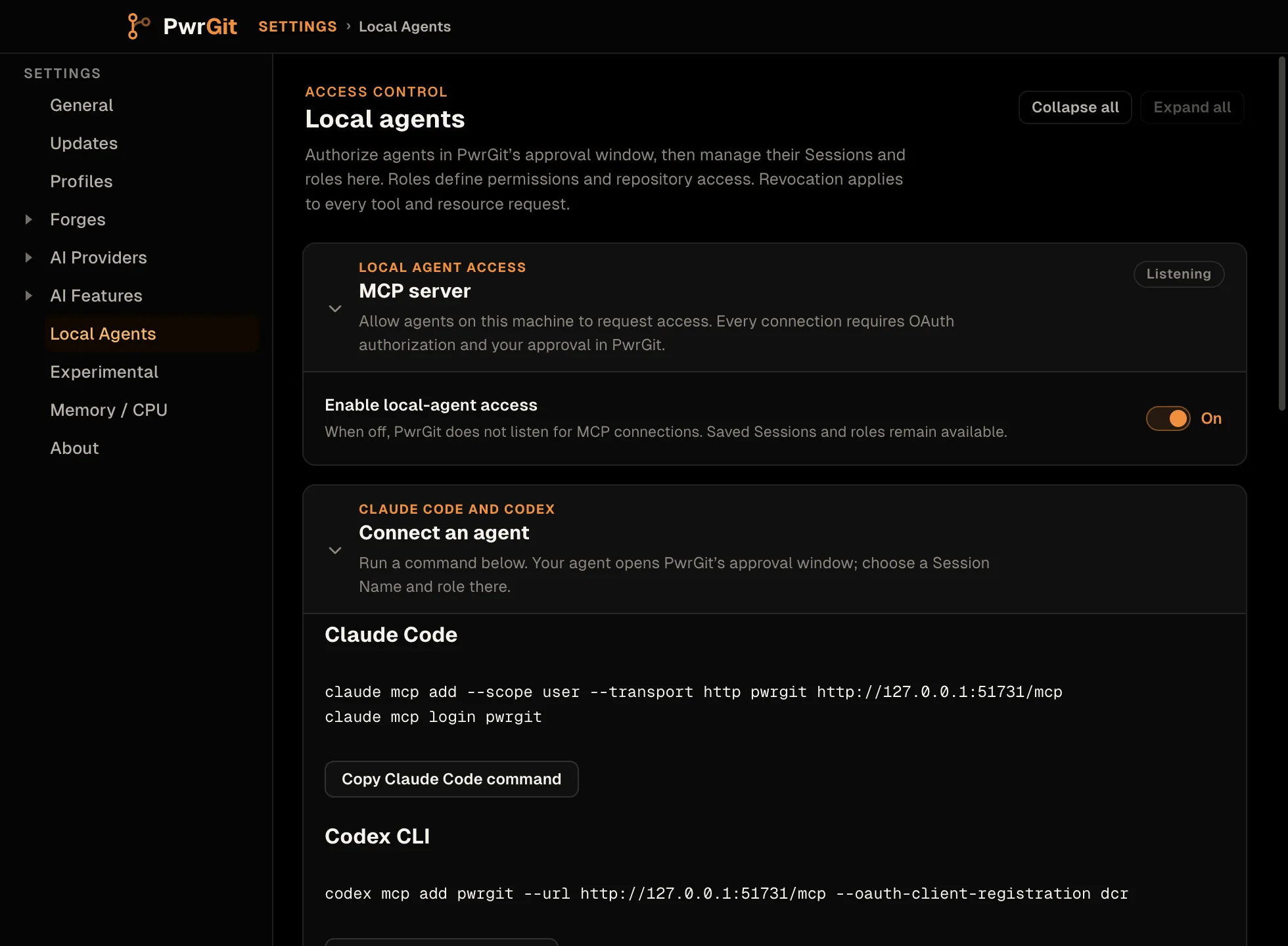
Claude Code:
claude mcp add --scope user --transport http pwrgit http://127.0.0.1:51731/mcp
claude mcp login pwrgit
Codex CLI:
codex mcp add pwrgit --url http://127.0.0.1:51731/mcp \
  --oauth-client-registration dcr
The client then asks PwrGit for access, and PwrGit opens its own window, Approve agent access: “client wants to connect to PwrGit. Review the permissions below.”
- Session Name — how this connection is listed later.
- Role — what the agent may do. Local Repository Reader is selected when the agent asked for it; only roles within what the agent asked for are offered. See Roles.
- Deny or Approve.
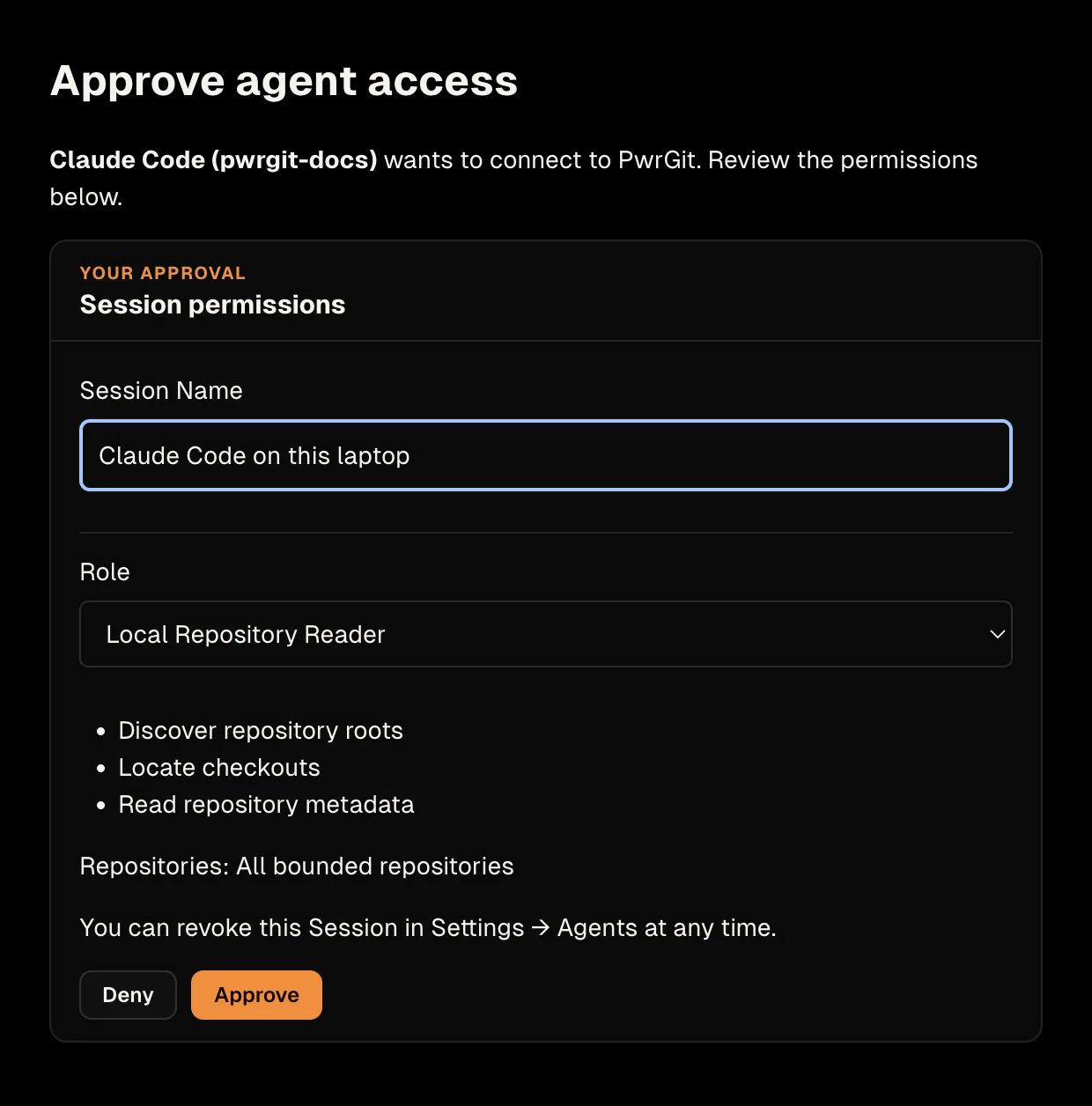
Approve, and the client receives its token directly. You never see or copy one.
What approval guarantees
- Only PwrGit’s window can approve. The browser page the client opens says “Continue in PwrGit” and has no form or script; nothing in a browser can grant access.
- An unanswered request expires after five minutes. The browser then reads “Approval expired. Start a new PwrGit login.” Run the client’s login again.
- The authorization is single-use. A leaked authorization link cannot be replayed into a second client.
- Denying is a real answer. Deny, or closing the window, tells the client no.
Other MCP clients
Any MCP client that supports Streamable HTTP with OAuth — dynamic client registration, the authorization-code flow with PKCE — can connect to the same URL. There is no way to mint a token by hand, by design: every token is the result of an approval.
What an agent can call
Ten tools. The parameter names matter: the repository argument
is repository, not identity, and the path arguments are
path, not repositoryPath.
Repositories and status
| Tool | Required | Optional |
|---|---|---|
pwrgit_repository_roots |
— | roots (string[], up to 32), includeConventional (boolean), maxDepth (0–5, default 4) |
pwrgit_find_checkout |
repository (string) |
provider (github | gitlab | gitcafe), roots (string[]), maxDepth (0–5), maxResults (1–20) |
pwrgit_repository_info |
path (string) |
maxWorktrees (1–64, default 10) |
pwrgit_watch_repository |
path (string) |
intervalMs (5000–300000, default 15000) |
pwrgit_live_status_capabilities |
— | — |
pwrgit_repository_roots— the folders where your repositories live: your profiles’ repo folders and the repositories PwrGit has indexed.includeConventionalis accepted but has no effect here: the app does not fall back to folders like~/src. Every scan is capped by depth and directory budgets, and a result says when a budget truncated it.pwrgit_find_checkout— locate a checkout from a forge identity:owner/name,host/owner/name, or a remote URL.pwrgit_repository_info— remotes, provider, default and current branch, worktrees, and counts of staged, unstaged, untracked, conflicted, ahead and behind. It returns the ten worktrees most in need of attention plus a summary over all of them, so a repository with dozens of worktrees still answers “does anything need attention” without costing an agent the whole list. RaisemaxWorktreesfor more.pwrgit_watch_repository— live status for one worktree, as apwrgit://status/v1/…resource the agent reads when it wants a fresh answer.pwrgit_live_status_capabilities— what the agent’s own Session is allowed to do, and the optional local WebSocket for live updates.
Missing worktrees
A worktree whose folder was deleted outside Git is reported with
missing: true and no status, and counted in the summary’s
missing total. The rest of the answer still comes back; one
missing checkout no longer fails the whole call. Missing
worktrees sort near the top, beside prunable ones.
The running app
| Tool | Parameters | What it does |
|---|---|---|
pwrgit_app_profiles |
— | Profile names, repo folders, the active profile and repository counts. No account email or credentials |
pwrgit_app_repositories |
profileId, query, sort (recently_viewed | name), limit (1–100, default 20) |
Search indexed repositories by name, path or branch, with their worktrees, pins and cached status |
pwrgit_app_recent_repositories |
profileId, limit (1–100, default 20) |
Repositories you actually selected in PwrGit, newest first |
pwrgit_app_open |
repoId (required), worktreeId |
Opens or focuses that repository’s profile window, optionally on one worktree |
pwrgit_app_refresh |
repoId (required) |
Picks up worktrees added or removed outside PwrGit and refreshes cached status |
“Which repositories was I working in?” is
pwrgit_app_recent_repositories. Its order is when you last
selected a repository in PwrGit, not when it last had a commit.
Cached status can be stale until refreshed — it is not a fresh
Git or network request.
pwrgit_app_open and pwrgit_app_refresh are the only tools
that change anything, and what they change is PwrGit’s own
windows and index, never a repository.
Roles and permissions
A Session is bound to one role, and the role is the whole of what that agent can do. Four are built in:
| Role | What it grants |
|---|---|
| Repository Discovery | Find repository roots, and locate a checkout by forge identity |
| Local Repository Reader | The above, plus repository metadata and status, and the app’s repository list |
| Live Forge Status | The above, plus pull/merge request, CI and review status, and live status |
| PwrGit Workspace Control | The above, plus opening repositories in PwrGit windows. No Git writes |
Pick Repository Discovery for an agent that only needs to find things, Live Forge Status only for one that genuinely watches your pull requests, and PwrGit Workspace Control only for one you want to drive PwrGit’s windows.
A Session can never exceed what its client asked for. Its effective permissions are its role intersected with the scopes approved at sign-in. Changing the role later cannot widen it past those scopes; reconnect the client to grant more.
Built-in roles cannot be edited. A custom role — New custom role, or Duplicate selected role — picks individual permissions and, more usefully, can be limited to Only these existing roots. That restricts every path-taking tool and both live-status paths to the folders you name. Symlinks are resolved before that boundary is checked, and a restricted role cannot quietly widen itself by falling back to other folders.
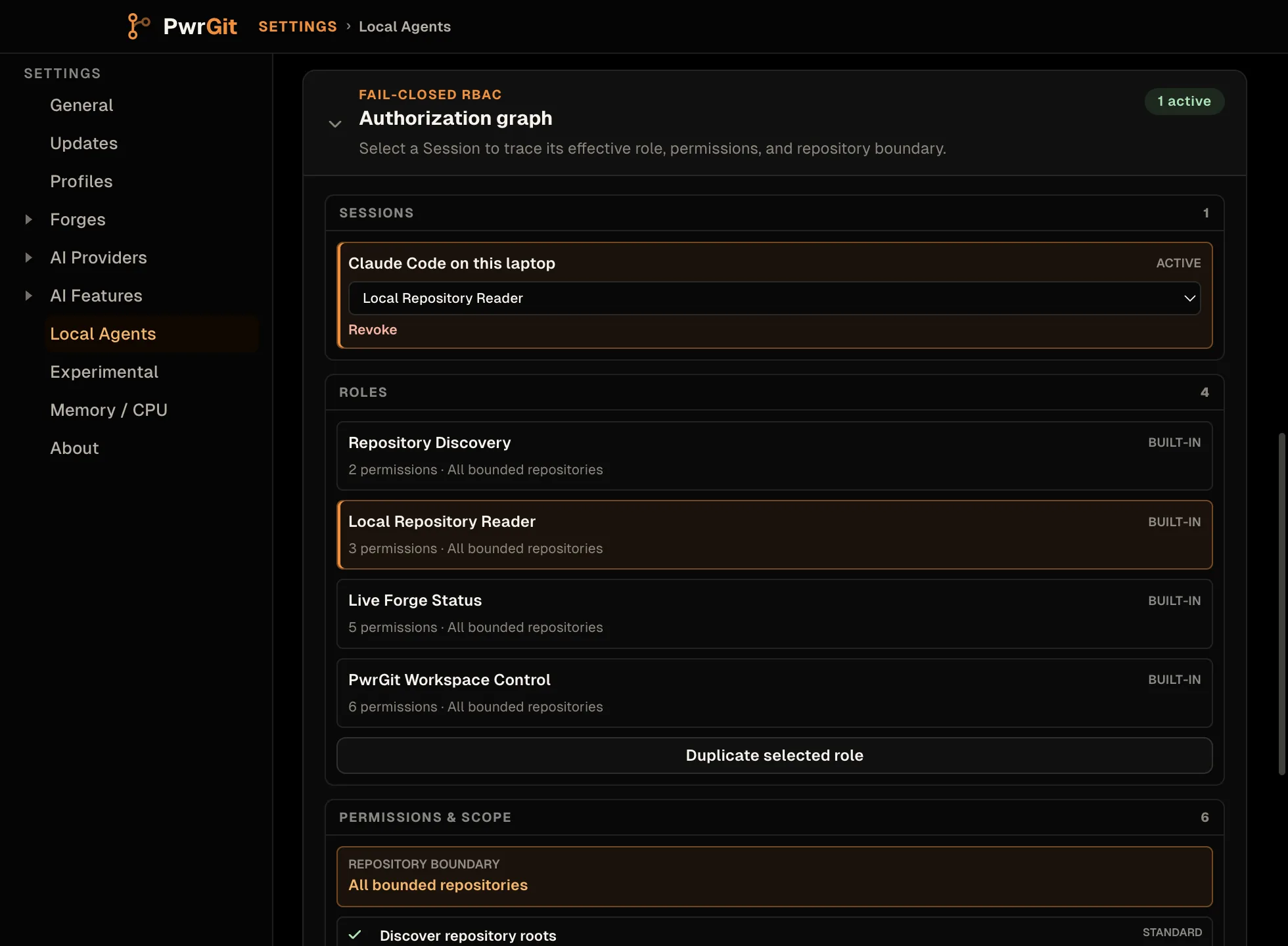
Settings → Local Agents → Authorization graph draws the whole thing: each Session, the role it holds, and the permissions and repository boundary that role resolves to.
What never leaves PwrGit
Repository status an agent reads is counts and states, never content. It does not contain:
- changed filenames or diff contents;
- commit messages, authors, or email addresses;
- environment values;
- raw remote URLs — remote identities are returned credential-free, as host and path.
Live pull and merge request status carries the request’s URL and the usernames of its latest reviewers. The app tools return local paths, branch names and profile names, which is what they are for.
Forge status goes through the gh and glab CLIs you are
already signed in to, exactly as the rest of PwrGit does.
PwrGit never extracts or returns their tokens. A signed-out
or missing CLI reports the provider as unavailable and local
status keeps working. See Forges.
Session tokens are stored only as SHA-256 hashes.
Revoke access
Settings → Local Agents → Authorization graph → Sessions, then Revoke on the Session. It also lists each Session as Active or Revoked, and lets you change a Session’s role in place.
Revocation applies to a running agent. PwrGit re-checks the authorization policy on every request — every tool call, resource read and live-status update — so a revoked Session stops working immediately, with nothing to restart on either side. Role changes and repository-root edits apply the same way.
Turning off local-agent access does not revoke anything. It stops the listener, so no client can connect while it is off, but every Session is still there when you turn it back on. Revoke the Session when that is what you mean.
Troubleshooting
| Symptom | Cause |
|---|---|
| The client cannot connect | PwrGit is not running, or Enable local-agent access is off. The chip reads Off |
| The chip reads Failed | The listener could not start — the error is under the switch. Another process may hold port 51731 |
| No approval window appears | The client’s login did not reach PwrGit — check the URL is exactly http://127.0.0.1:51731/mcp |
| “Approval expired. Start a new PwrGit login.” | Nobody answered within five minutes. Run the client’s login again |
| “No role fits the permissions requested by this agent.” | The client asked for fewer scopes than any role needs |
| An agent gets permission errors on some tools | Its role, or the scopes it was approved with, do not grant that permission — check the Authorization graph |
| An agent sees no repositories | Its role is restricted to roots that do not contain them |
| Pull request or CI status is missing | gh / glab is missing or signed out — see Forges → Troubleshooting. GitCafe has no live status |
Not yet
- No MCP resource subscriptions over HTTP. An HTTP client
reads a status resource when it wants a fresh answer, or uses
the optional local WebSocket that
pwrgit_live_status_capabilitiesdescribes. - No live status for GitCafe. Its repositories are found and identified; their request and CI status is not read.
- No command-line package. The server is not published to
npm and PwrGit installs no
pwrgit-mcpcommand. A standalone stdio build exists for existing clients, but it runs from a PwrGit source checkout; connect over HTTP instead.
The protocol
This page covers connecting an agent. The versioned wire
contract — resource schemas, the CI and review state vocabulary,
event kinds, the OAuth routes and loopback checks, and the
discovery budgets — is in
docs/mcp-server.md
in the PwrGit repository.