
Worktrees
A git worktree is a second working directory checked out from one repository. Branches share the repository’s objects; each worktree has its own files on disk, so you can have several branches checked out at once and switch between them by changing directory rather than by changing branch.
PwrGit treats worktrees as the unit of work. A repository in the sidebar expands into its worktrees, and selecting one is what loads the graph, the changes list, and the sync buttons.
Why worktrees are the unit
The practical consequence is that switching tasks does not touch your working tree. A half-finished change on one branch stays exactly where it is while you look at another; there is nothing to stash, and no rebuild triggered by files changing underneath a running process.
It also means “which branch am I on” is rarely the question. The question is which directory you are in, and the sidebar answers it.
Create a worktree
Every route ends in a new directory with a branch checked out in it, and every route selects the new worktree when it is done. You asked for a branch because you want to work on it, so PwrGit takes you there rather than filing it away among the others.
From a branch
+ New worktree, at the bottom of a repository’s worktree list, opens New worktree · repo: a branch name and a Create as a new branch checkbox.
- Leave it unchecked to check out a local branch that already exists.
- Check it to create the branch. Without a start point it starts from whatever the primary checkout has checked out.
The same dialog opens, pre-filled, from other places:
- A branch row in the refs browser — the New worktree button beside Switch here.
- A remote branch. The new local branch is created from the fetched ref; the dialog reads Starting from remote/branch and the checkbox is locked on.
- A branch picked in Command+K search that has no worktree yet. There is nothing to select, so PwrGit offers to make one.
From a pull or merge request
An open request’s menu has New worktree from #n, followed by what it will fetch first — the source branch from your remote, or, for a request opened from a fork, the head from that fork under a local branch name. The dialog shows the request’s chip and title, and the new worktree keeps that request as its context, so its status follows the row. See Pull requests.
From a commit
Branch from this commit… in a commit’s context menu in the graph asks for a branch name and one Check out choice:
| Choice | What happens |
|---|---|
| Don’t check out | Creates the branch pointer only. Nothing on disk changes. |
| In a new worktree | Creates the branch and a worktree for it. The button reads Create branch & worktree. |
| In this worktree (branch) | Switches the branch checked out here. Unavailable while this worktree has uncommitted changes, and the option says so. |

Where new worktrees go
New worktrees are created at ~/wt/<repo>/<branch>, with
every / in the branch name replaced by - — feat/token-miser
in openclaw lands in ~/wt/openclaw/feat-token-miser.
The worktree root is
~/wt. There is no setting in the Settings window to change it.
Worktrees made outside PwrGit
PwrGit lists every worktree a repository has, not only the ones it created. A worktree you added from a terminal appears wherever it lives on disk, with the same marks and the same actions.
The reverse also holds: PwrGit notices when a worktree is added, removed or switched outside the app and refreshes the sidebar. The refresh button beside the Worktrees heading re-reads git on demand. It does not fetch.
The worktree list
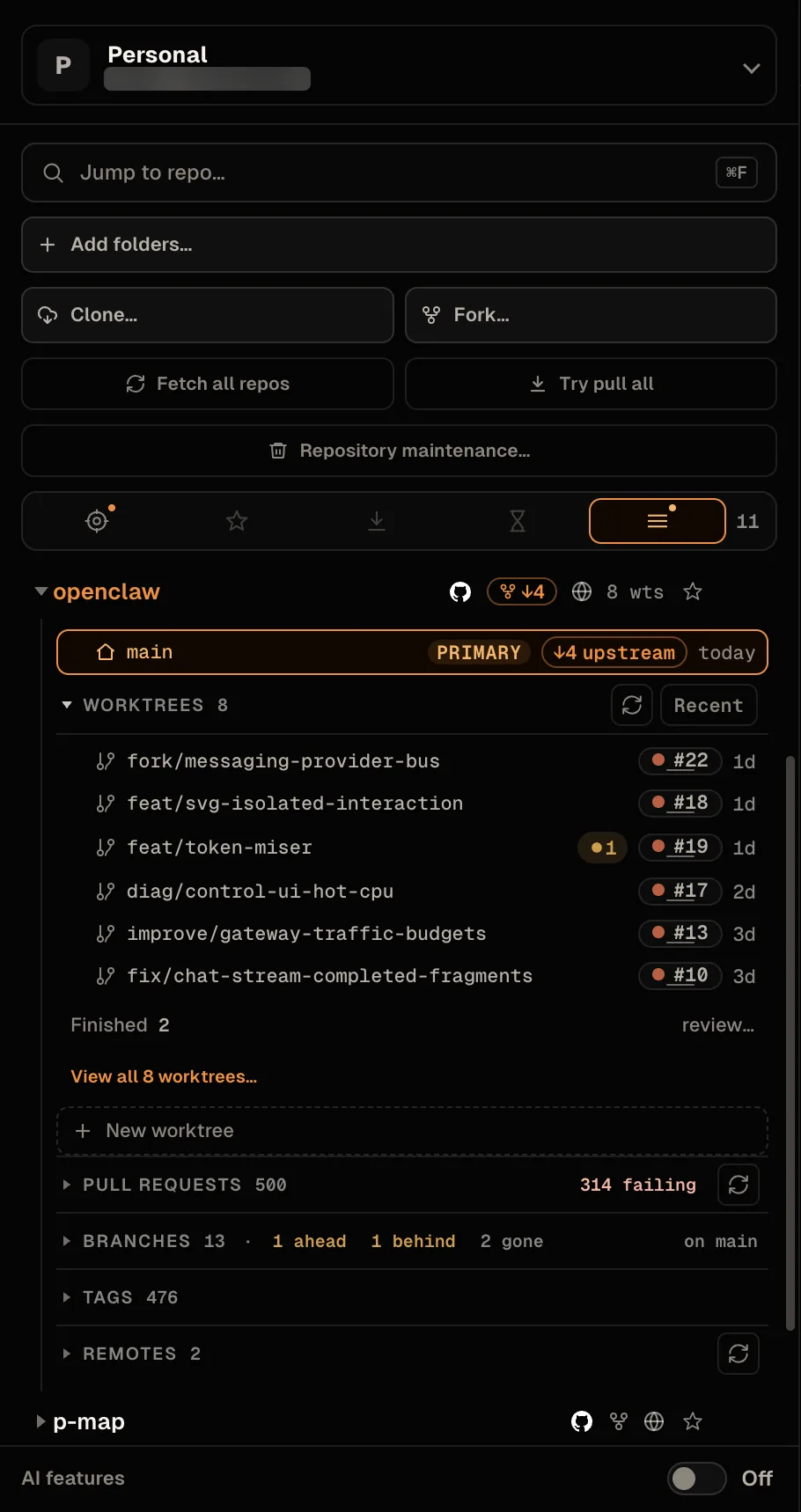
Under each repository, the Worktrees disclosure shows the first six worktrees that are still in flight, in the order the sort chip names. The rest are counted, not drawn:
- Finished n review… — clean worktrees that are done with. See Finished worktrees.
- View all n worktrees… — the complete list, in the refs browser.
- + New worktree — the dialog above.
Pinned worktrees sit above the disclosure under their own heading, and the disclosure is then labelled Other worktrees. The headings always add up to the count on the repository row.
Selecting a worktree outside the six — from search, or from the refs browser — does not reshuffle the list. The row is drawn below the six under a dashed visiting rule, tagged with where it came from (Other, Finished, or In flight), and goes away when you select something else.
The sort chip cycles Recent → Pinned → A–Z → Active. Dragging a row, or Command+Shift+Up / Command+Shift+Down on a selected row, sets your own order and the chip reads Custom; cycling again clears it. On Windows the chord is Ctrl+Shift+Up / Ctrl+Shift+Down.
Reading a worktree row
A row is the branch name, plus whichever of these apply:
| Mark | Meaning |
|---|---|
| primary | The repository’s original checkout, not a linked worktree. It cannot be removed. |
| directory missing | Git still registers the worktree but the folder is gone. Remove it, or put the folder back (remount the volume) and refresh. |
| locked | Locked with git worktree lock, usually on removable media. Removing it needs force. |
| gone | The branch it tracks was deleted on the remote, usually because the work landed. Hidden when a merged or closed request chip already explains it. |
| ●n | n uncommitted changes |
| ↑n | n commits to push |
| ↓n | n commits to pull. On a fork whose source has moved on, the badge carries ⑂ and counts against the source — see Sync. |
| #n / !n | The branch’s pull or merge request and its state. See Pull requests. |
| in default | Every commit is already in the default branch, by git ancestry |
| diverged | Shares no history with the default branch — rewritten or orphaned |
| Age | Time since the last commit or file change |
| Folder | A second line when the directory name differs from the branch name |
in default is detected by ancestry, which is a narrower claim than it sounds: a squash or rebase merge rewrites the commits, so the originals are not in the default branch and the tag will not appear even though the work landed. The merged request chip covers that case instead.
How far the default branch has moved on without this branch —
main +4 — is shown in the selected worktree’s header, beside
the sync chip, not on the row. It is not a sync state and pulling
will not change it, which is why it never takes the warning
color.
Finished worktrees
Finished is a display rule: it decides which rows the list counts instead of drawing. A worktree is finished when it is clean, not pinned, and done with in one of three ways:
- its pull or merge request is merged or closed, and the
request’s head is the worktree’s
HEAD; - its upstream branch is gone; or
- it is already in the default branch by ancestry, and has been for at least 24 hours — so a branch cut a minute ago, with no commits yet, is not finished.
The primary checkout, the default branch, a missing directory, and a locked worktree are never finished. Finished hides a row from the short list; it never removes anything.
Finding prunable worktrees
Prunable is a deletion rule, and stricter than finished. It drives the Stale lens in the sidebar — Repos with worktrees safe to prune — and the worktree step of Repository maintenance. A worktree is prunable when it is:
- not the default branch, not the primary checkout, not missing, and not locked;
- clean — no uncommitted changes; and
- either its pull or merge request is merged — definitive at any age, and what catches squash and rebase merges — or it is in the default branch (or shares no history with it at all) and its last commit is more than 14 days old.
A closed-but-unmerged request makes a worktree finished, but never prunable.
The merged-request half needs a connected forge CLI. Without one, the git half still works — it just cannot see squash-merged branches. See Forges.
A third rule, for local branches with no worktree, lives in maintenance: a branch whose upstream is gone and whose commits are proven to exist elsewhere. See Finished branches.
The Worktrees tab
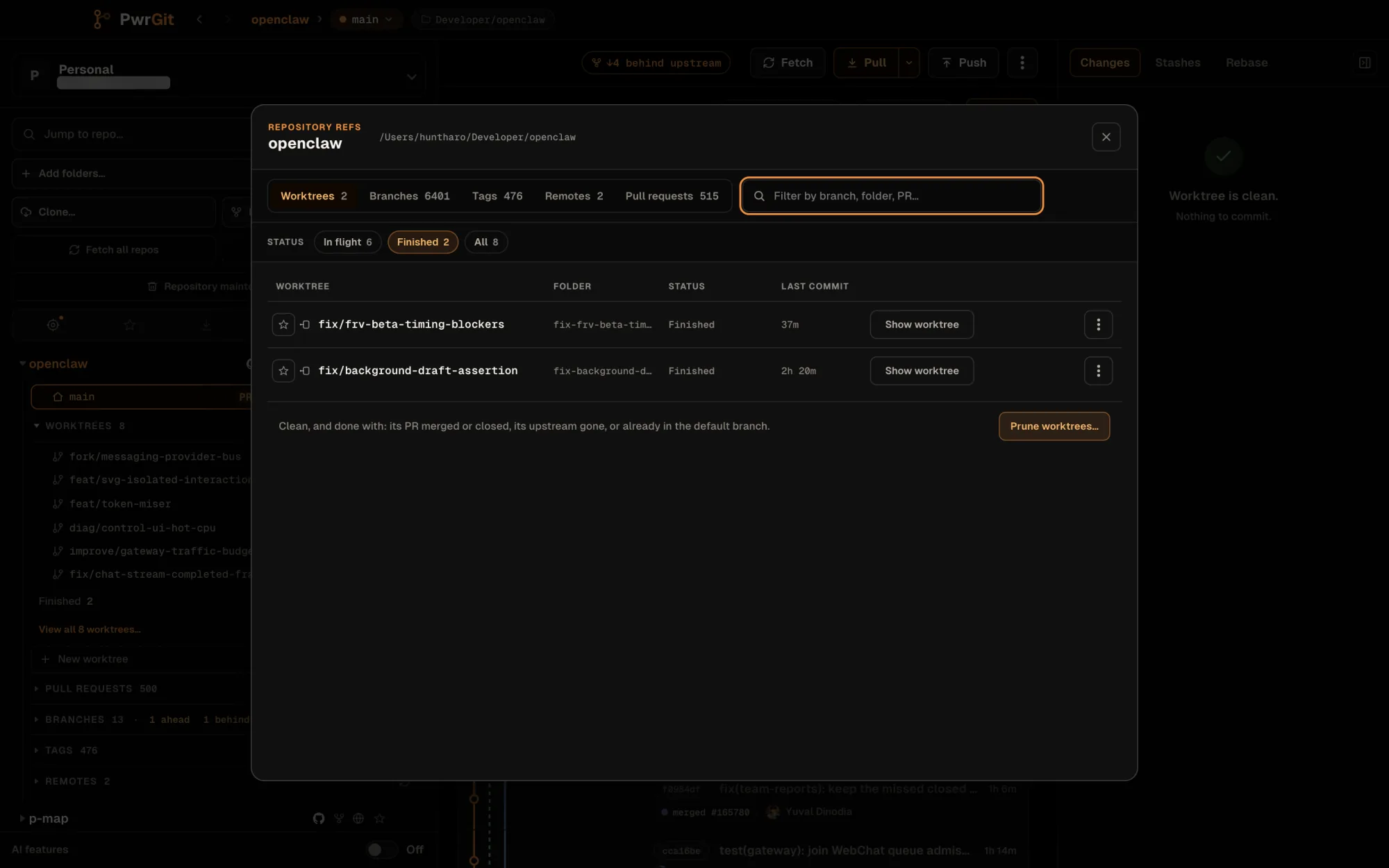
View all n worktrees… and Finished n review… both open the repository’s refs browser on its Worktrees tab, the first of its tabs. It lists every linked worktree with Worktree, Folder, Status and Last commit columns, filtered by In flight, Finished or All.
Each row can be pinned, copied (branch name or path), selected, or removed. Under the Finished filter, Prune worktrees… opens Repository maintenance on its Worktrees tab, with nothing ticked until you tick it.
Switch a worktree to another branch
You do not need a new directory for every branch. Switch here on a branch row in the refs browser, Switch to branch on a branch chip, and In this worktree in Branch from this commit… all check out a different branch in the selected worktree.
If the branch is already checked out in another worktree, PwrGit selects that worktree instead — git allows a branch in one place at a time.
If this worktree has uncommitted changes, PwrGit asks what they are for rather than guessing. Switch to branch? lists the changed files and offers:
- Bring them to branch — PwrGit stashes the changes, switches, and reapplies them on branch. If they cannot be applied there, everything is rolled back: you stay on the original branch with your changes untouched.
- Commit on here first — stays put and opens the commit box. Nothing is switched.
- Cancel.

Remove a worktree
Right-click a worktree row for Copy branch name, Copy path, Reveal in Finder (Show in Explorer on Windows, Show in folder on Linux), and Remove worktree. Shift-click or Command-click (Ctrl on Windows and Linux) selects several rows; the menu then offers Remove n worktrees… and Copy n paths.
- One clean worktree is removed without a confirmation.
- Several ask first — Remove n worktrees? — and say that branches and commits are kept.
- Uncommitted changes stop the removal with a second prompt, Remove anyway, which forces it.
- The primary checkout cannot be removed.
Removing from inside PwrGit is better than deleting the directory
yourself: git worktree remove also clears the administrative
entry the repository keeps for that checkout. Deleting the folder
by hand leaves that entry behind, and the row reads directory
missing until something prunes it.
Removing a worktree does not delete its branch. The branch and its commits stay in the repository; only the checked-out directory goes. To clear out finished worktrees and branches across every repository at once, use Repository maintenance.