
Pull requests
PwrGit lists the open pull requests — merge requests on GitLab —
for every repository in the sidebar, shows any of them in-app
without checking it out, and puts one in a worktree when you
want to work on it. It reads them through gh or glab; see
Forges to connect one.
GitLab’s vocabulary is used wherever the host is GitLab:
Merge requests, and !12 rather than #12 on chips. Search
accepts either sigil.
In the sidebar
Each repository on a forge has a Pull requests section (Merge requests on GitLab, Pull & merge requests when its remotes span both), between its worktrees and Branches. It starts collapsed and remembers whether you opened it.
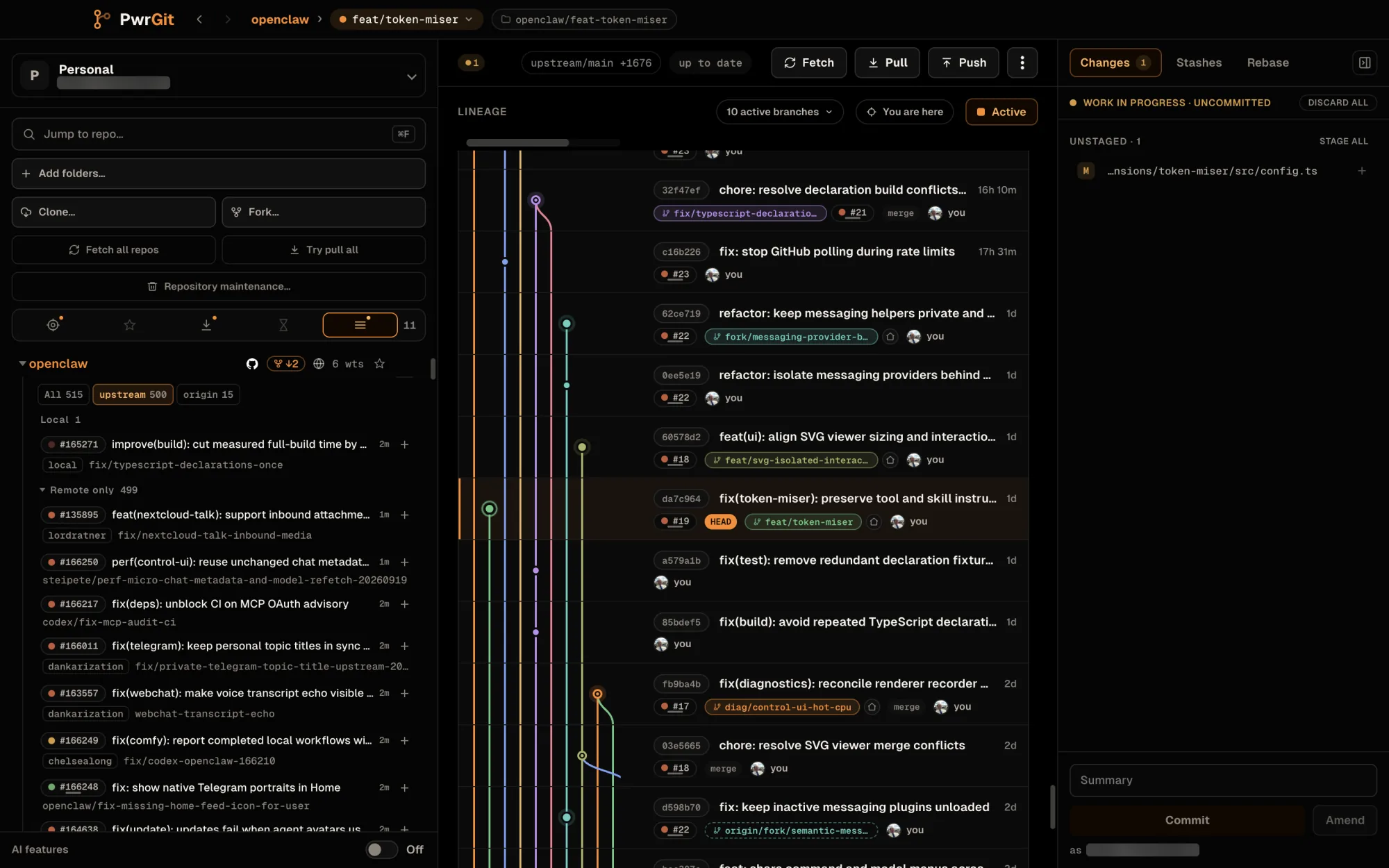
Every forge remote is listed, not just origin. On a fork,
origin is your fork and upstream the original, so the
request you sent upstream from your fork appears on upstream’s
list. A remote on a host you are not signed in to is left out.
Requests are grouped by where their head is:
- Local — a worktree or a local branch holds the head. A branch that heads two requests — one on your fork, one you sent upstream — is drawn once, with the second as an extra chip.
- Remote only — the head is only on the forge, or fetched as a remote branch. Collapsed until you open it.
Each row shows the request chip, its title and age, then where the head lives: the worktree holding it, a local tag, the fork it comes from, or branch gone — and the head branch, which copies on click, with → base when the base is not the default branch.
Filters
- By remote. With two or more remotes that have something open, All and one segment per remote appear, each with a count. More than three remotes become a Remote dropdown. Under All, each row carries a chip naming its remote.
- Failing. When any open request has failing checks or a merge conflict, a N failing chip appears. Turn it on to show only those.
Both choices are remembered per repository.
Refresh
The refresh button beside the heading asks the forge again; its tooltip says when the list was last refreshed. Opening the section does not cost a forge request — the list refreshes in the background with the repository sweep, and on demand. If a refresh fails, the section says so and keeps showing the last list, with its age. Up to 500 requests per remote are listed, most recently updated first.
Row actions
| Do | Result |
|---|---|
| Click the row, or Space | Opens the request view |
| Return, or double-click | Goes to the worktree holding it, or starts a new worktree |
| The house button | Show checked-out worktree |
| The + button | A new worktree for the request — its tooltip says what will be fetched first |
| Click the request chip | Opens the request on the forge |
| Option-click the chip (Alt-click) | Copies its URL |
Search pull requests, including closed… at the bottom opens the refs browser on its requests tab.
In the refs browser
The refs browser has a Pull requests (or Merge requests)
tab beside Worktrees, Branches, Tags and Remotes.
Its filter matches number, title, branch and author. A bare
number — 106, #106, !106 — matches only that request, never
#1060. A number that is not open is looked up on the forge, so
closed and merged requests can be found too.
Columns are the request, Author, Checks and Updated. Under each title, a tag says where the head is:
| Tag | Means |
|---|---|
| worktree | Checked out in a worktree |
| local | A local branch holds it |
| remote name | Fetched as a remote branch |
| not fetched | On the remote, not fetched yet. Switching fetches it first |
| fork | From someone’s fork. Switching fetches it from the forge |
| branch gone | Its branch no longer exists |
Each row has a primary action — Show worktree, or Switch here to move the selected worktree onto the request’s branch, fetching first if it must — then New worktree, and a menu with Open pull request in browser and Copy pull request link. Down Arrow from the filter enters the rows; Return or a double-click runs the primary action.
In the Command Palette
Command+K (Ctrl+K) finds requests by
number or title. 123, #123 or !123 matches only that number
and puts it first.
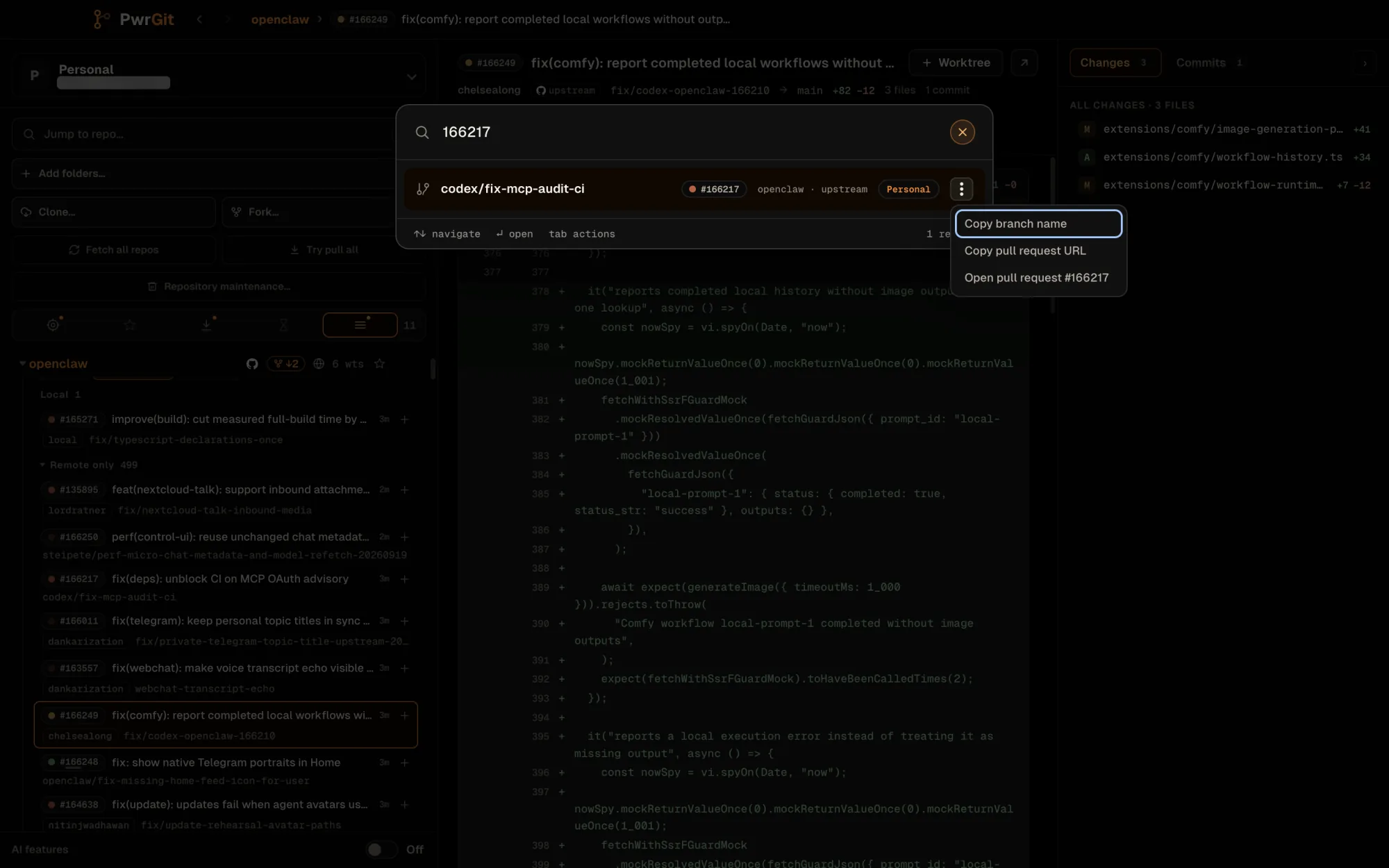
If a worktree or branch already holds the request’s head, the result is that worktree or branch, carrying the request chip. Otherwise the result is the request itself, marked not fetched or fork; Return fetches it and then goes to its worktree or opens New worktree. The row’s menu (Tab reaches it) has Copy branch name, Copy pull request URL and Open pull request #N.
Read a request without checking it out
Click a request in the sidebar and the main pane shows it: title, author, head → base, size, and age, with Open on GitHub (or GitLab), and Go to worktree or Worktree to put it in one.
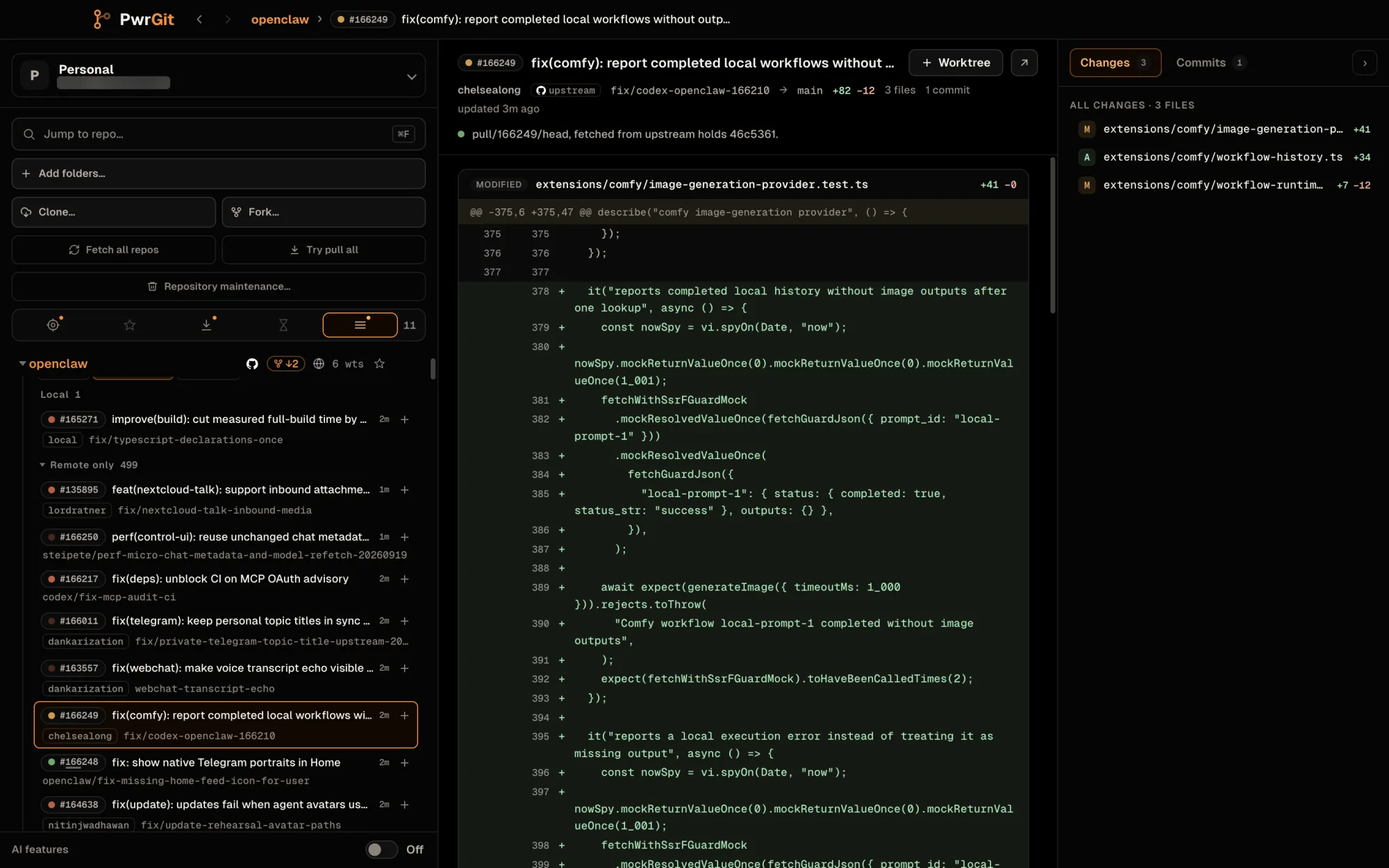
- Changes lists every file with its additions and deletions; click one to jump to it in the diff.
- Commits lists the request’s commits. Pick one to read just that commit; Show all changes goes back.
Nothing is checked out and no branch is created. PwrGit fetches the head if it is not already here — a branch from the same repository into its normal remote branch, a head from a fork from the forge’s request ref into a hidden ref PwrGit prunes once the request closes — and diffs it against the merge base with the base branch. A row reached with the arrow keys waits a moment before fetching, so scrolling through the list does not fetch every request.
Which revision you are reading
A line under the header says exactly what the diff is, and whether your copy matches the forge:
| Line | Button |
|---|---|
| “Holder holds sha, the head GitHub shows.” | — |
| “Holder holds sha: N commits ahead of what GitHub shows, unpushed.” | Show GitHub’s head |
| “Showing GitHub’s head, sha. Holder is N commits behind.” | Show yours |
| “… Yours and GitHub’s have diverged: A ahead, B behind.” | Either |
| “Holder holds sha. GitHub shows sha, which is not fetched here.” | Fetch GitHub’s head |
| “… is not in this checkout yet. Nothing gets checked out to look at it.” | Fetch |
Holder is the worktree, local branch, or fetched ref that has the head. By default the newer of the two is shown.
Escape, Back (Command+[, or Ctrl+[), or picking a worktree leaves the view.
Put a request in a worktree
+ in the sidebar, New worktree in the refs browser, and Worktree in the request view all fetch the head and open New worktree with the request shown under the title, so you can see what you are checking out.
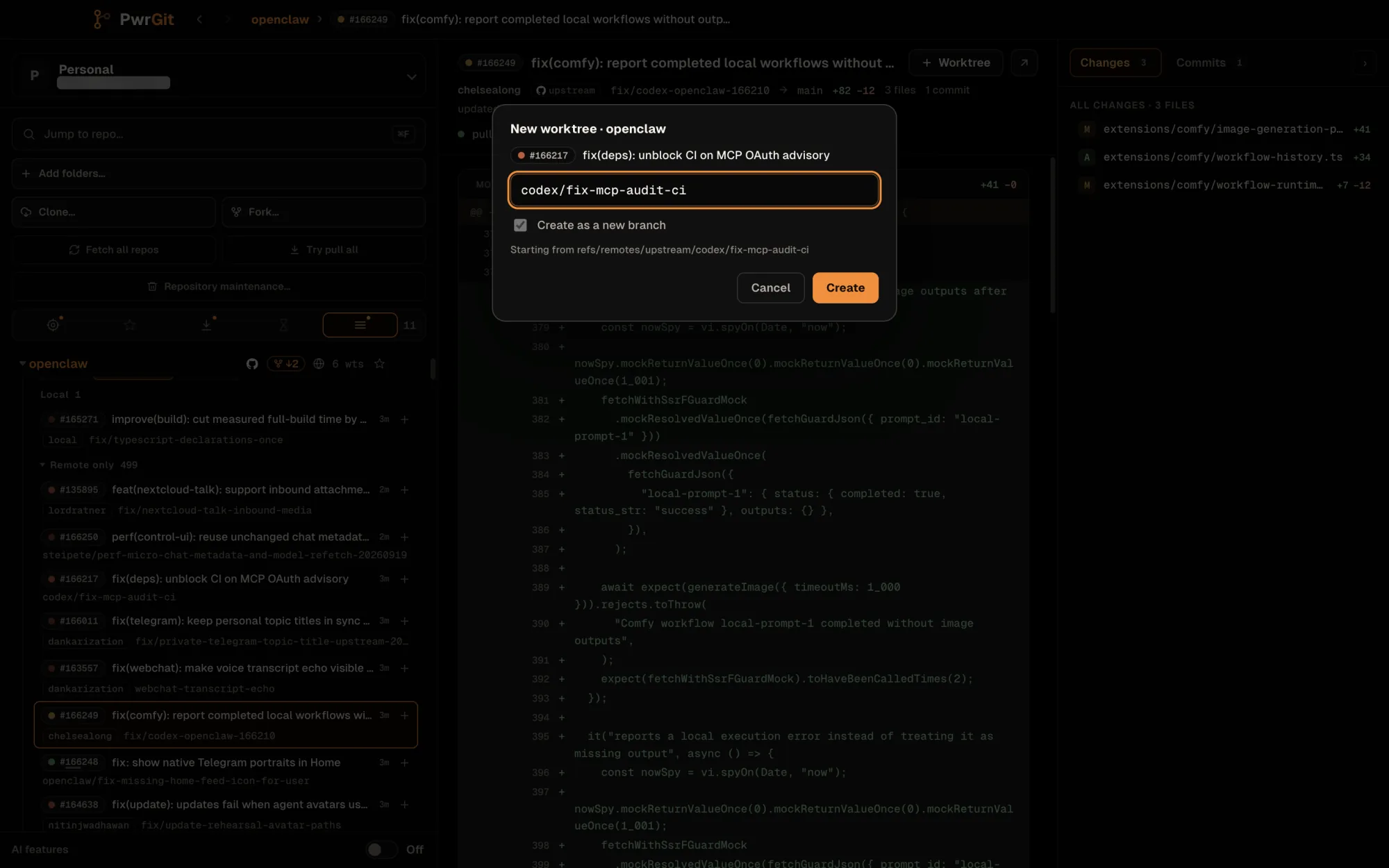
- A branch from the same repository keeps its name, created from the fetched remote branch.
- A head from a fork becomes a numbered branch:
pr/123, orpr/upstream/123for a request on a remote other thanorigin(mr/on GitLab). It is set to pull from the forge’s request ref, so a later Pull follows the request.
If the head is already checked out, every one of these goes to that worktree instead.
Chips in the lineage graph
Commits and branch tips with a request carry its chip:
- Open — the dot follows checks: passing, failing (or a merge conflict), pending, or unknown. A pulsing dot means some checks failed while others still run.
- Draft — a grey bar under the number.
- merged #N and closed #N — after the fact.
Hover or focus a chip for its card: head → base, review and checks state, diff size, commit count, and when it was opened, merged or closed. The card makes no network request.
Squash and rebase merges get a dotted line. When a merged request’s branch tip and the commit it landed as are both on screen, and no Git parent links them, a dotted line joins them — “PR #N landed without a Git parent edge”. It is drawn for reading only; it is never a Git parent.
When the branch disappears
When a branch’s upstream is deleted on the forge — usually because the request was merged — PwrGit asks the forge about that request straight away, instead of waiting for the next sweep. The worktree row’s gone tag gives way to the merged or closed chip.
Not yet
- No creating, reviewing or merging requests. PwrGit reads requests; open one on the forge to act on it.
- No GitCafe fork heads. GitCafe publishes no ref to fetch a fork’s request by, so those rows offer no worktree.