
Forges
PwrGit reads pull and merge requests, repository visibility,
fork relationships and commit author avatars from your forge,
and can fork and clone through it. All of it goes through the
CLI you already sign in with — gh for GitHub, glab for
GitLab, cafe for GitCafe.
Pull and merge requests have their own page: Pull requests.
What PwrGit reads, and how it signs in
PwrGit never asks you for a password, and stores no token of
its own. It delegates to the CLI’s existing login. Signing out
of gh signs PwrGit out too; there is no second credential to
revoke, and no new place for one to leak from.
This is best-effort by design. When no forge claims a repository’s remotes, when the CLI is not installed, when it is not signed in, or when the network is down, these features quietly do nothing. Nothing else in PwrGit stops working — git operations do not go through a forge.
A hostname alone never identifies a forge. PwrGit recognizes a host because:
- it is the hosted instance — github.com, gitlab.com, git.cafe;
- the CLI reports being signed in to it; or
- you added it under Settings → Forges.
A remote on any other host gets no forge features, rather than a
guess. Status, visibility and the fork relationship describe
origin — what you push to. Pull and merge request lists also
read every other remote a forge claims, such as upstream.
Connect GitHub
Install the GitHub CLI and sign in:
gh auth login
Settings → Forges updates on its own once you have — you do not need to reopen it, and PwrGit does not need restarting.
For GitHub Enterprise, sign gh in to that host
(gh auth login --hostname github.example.com), or use Add
GitHub Enterprise… to name it before you have.
Connect GitLab
Install the GitLab CLI and sign in:
glab auth login
gitlab.com and self-managed instances are both supported. For a
self-managed instance, run glab auth login --hostname
gitlab.example.com, or use Add GitLab instance…. GitLab
calls them groups and merge requests where GitHub says
organizations and pull requests; PwrGit follows whichever host
you are on.
Connect GitCafe
GitCafe goes through the cafe CLI, version 0.5.0 or newer,
which needs Bun:
bun i -g @gitcafe/cli
Then sign cafe in; Settings → Forges shows the exact
command, with Copy command. GitCafe supports fewer features
than the other two — see What each forge
supports.
Hosts
Settings → Forges has one card per forge, each with a status chip — Connected, Signed out, Not installed or Off — and a row per host.
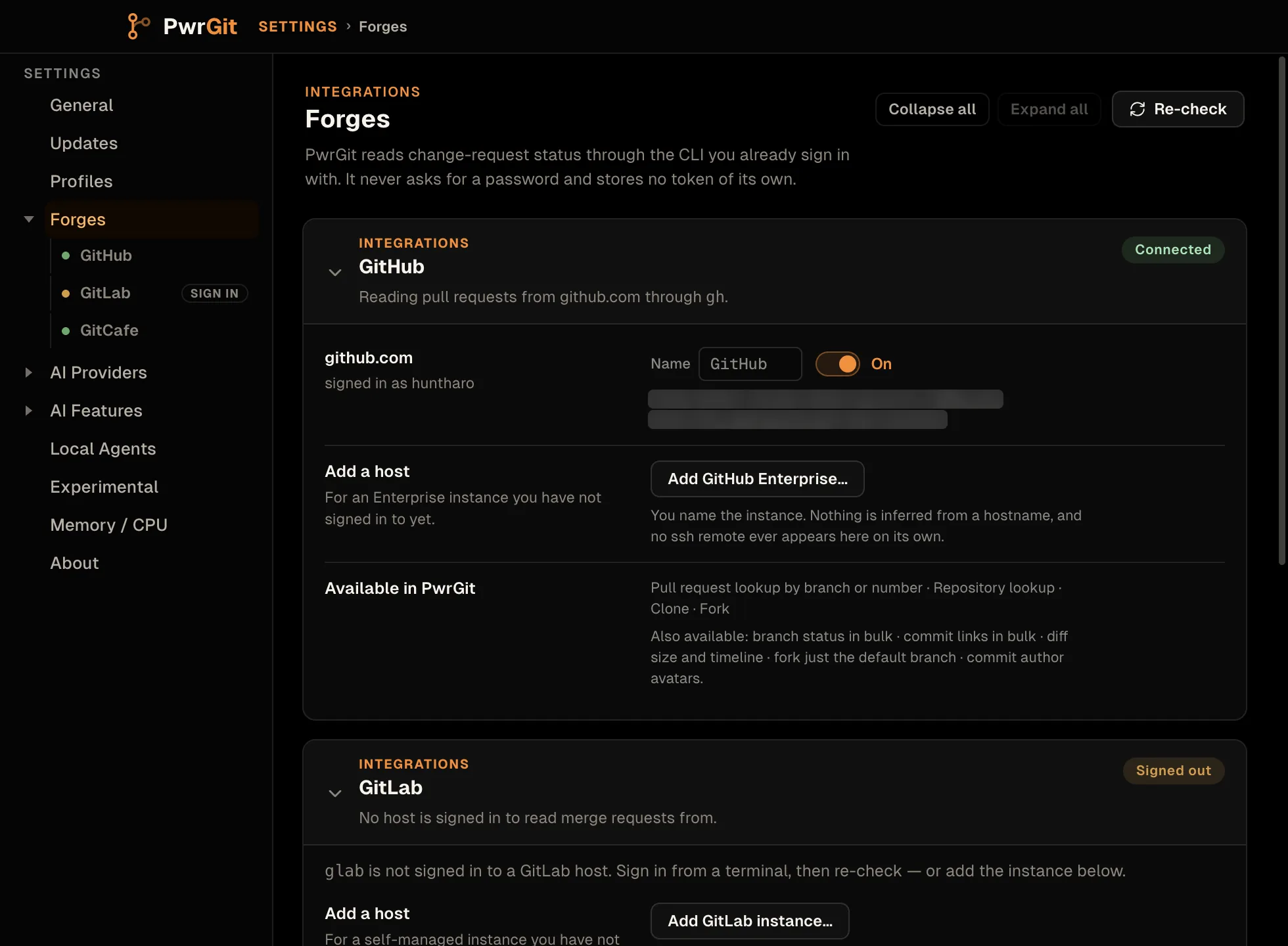
- Each host has its own switch, labelled Read GitHub status from host for screen readers. Off means PwrGit reads nothing from that host and mints no token for it — clones and forks included. There is no switch for a whole forge; a forge whose hosts are all off reads Off.
- Add GitHub Enterprise…, Add GitLab instance… and Add GitCafe host… add a host the CLI is not signed in to yet. You choose which forge it is; nothing is inferred from the hostname. Remove host removes one you added.
- Name sets the short label shown on that host’s chips.
- A host the CLI has no account for shows the sign-in command, with Copy command.
Re-check at the top asks every CLI again.
Identity and visibility marks
Each repository row in the sidebar, and each remote under Remotes, carries the forge’s mark. Clicking it opens that repository’s page in your browser. The mark shows whenever the host is recognized, even if its integration is switched off.
Beside it, a visibility mark says where your code can go:
| Mark | Means |
|---|---|
| Globe | Public |
| Lock | Private |
| Building | Internal |
| Faded question mark | Unknown — PwrGit asked and the forge would not say |
| No mark | Never asked — no forge, CLI missing, or not signed in |
Neither unknown nor no mark is treated as public. Click the mark to re-read visibility. A known visibility is re-checked every six hours; an unknown one every five minutes.
Two more marks appear when the forge reports them: a fork
mark, with Fork of owner/name in its tooltip, and a
read-only mark when the forge says you cannot push to
origin — see Read-only checkouts.
Refresh forge info in the repository row’s menu re-reads all of these.
Commit author avatars
In the lineage graph, each commit’s author is a button with an
avatar. Hover, focus or click it for a person card: name,
email with Copy email address, the forge login, how many of
their commits and branch tips are in the graph, Co-author
line to copy a Co-authored-by: trailer, and Open on
GitHub (or GitLab).
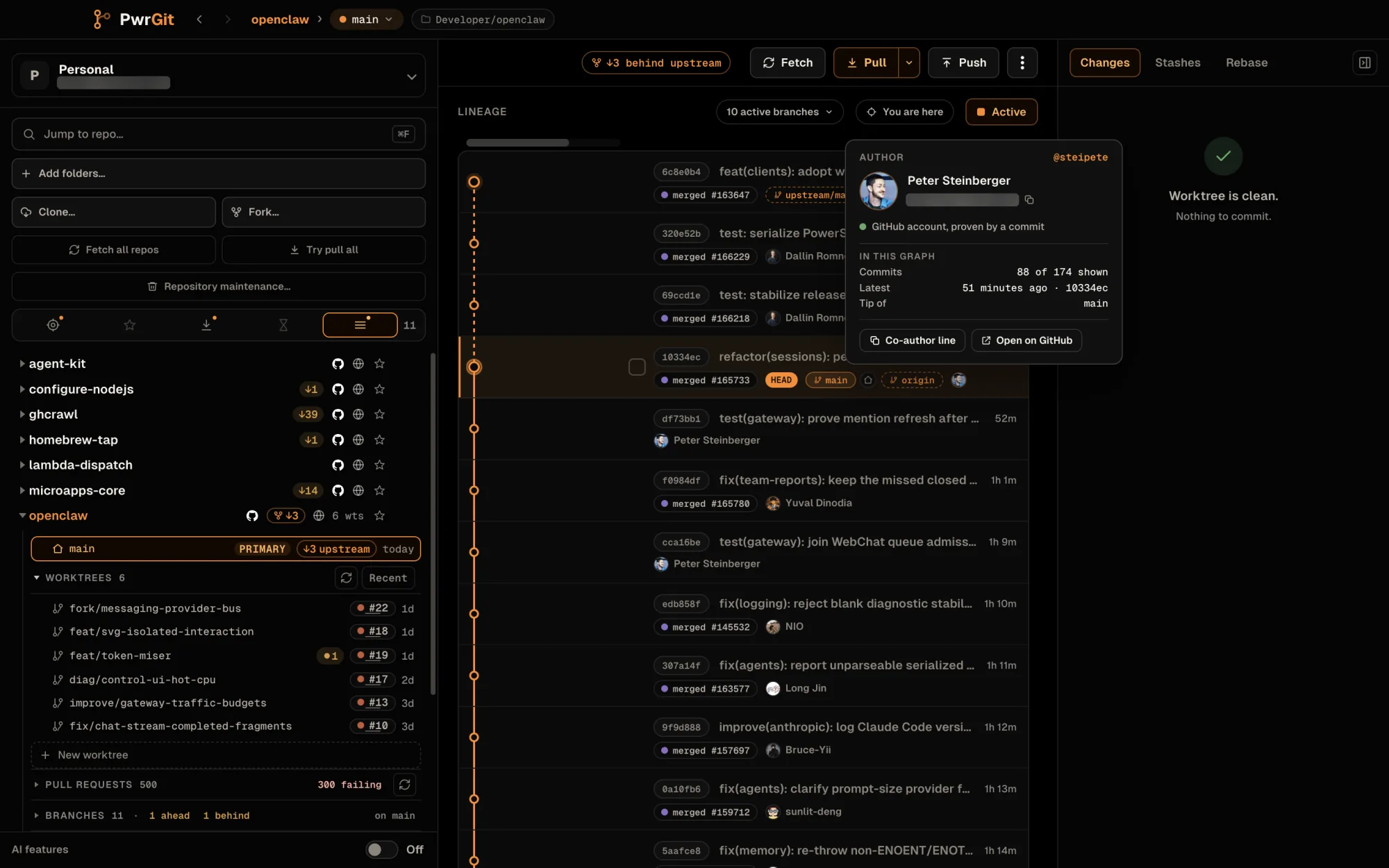
An avatar is shown only when it is proven. PwrGit looks up the exact commit on the forge and accepts the account only if the forge’s commit carries the same Git author name and email you have locally. Otherwise the card says so — GitHub links these commits to no account, Not checked with GitHub yet — and shows initials, rather than a guess. See History → author identity.
Both GitHub and GitLab are read through their CLI’s login, so this never widens what PwrGit can see. GitCafe does not offer it.
Pull and merge request status
Branches with an open request carry a chip with its number and state. The sidebar lists every open request for a repository, across its remotes, and PwrGit can show one without checking it out. All of it is on its own page: Pull requests.
What each forge supports
Every forge supports request lookup by branch or number, repository lookup, clone and fork. Settings → Forges lists the rest per forge, under Available in PwrGit. A missing capability is a limit of that forge’s API or CLI, not a bug in PwrGit:
| Capability | GitHub | GitLab | GitCafe |
|---|---|---|---|
| Branch status in bulk | Yes | Yes | No |
| Commit links in bulk | Yes | No — no batch endpoint | No |
| Diff size and timeline | Yes | Yes | No |
| Commit author avatars | Yes | Yes | No |
| Fork just the default branch | Yes | No — no equivalent in its fork API | No |
GitCafe also reports no push permission, so it never shows a read-only mark, and publishes no ref to fetch a fork’s request head by.
Where a capability is absent, the UI hides the control rather than showing one that would be accepted and silently ignored.
Repository search covers the hosted instances only. In the
Clone and Fork dialogs, typing a partial name searches
github.com, gitlab.com or git.cafe. On an Enterprise or
self-managed host, paste the full URL or owner/name instead.
Forks
Fork… creates your copy on the forge and points a checkout at it. Start it from:
- Fork… in the sidebar toolbar;
- Fork owner/name… in a repository row’s menu, or in the worktree header’s menu;
- the fork button on the
originrow under Remotes; - the read-only mark, or a push the forge refused.
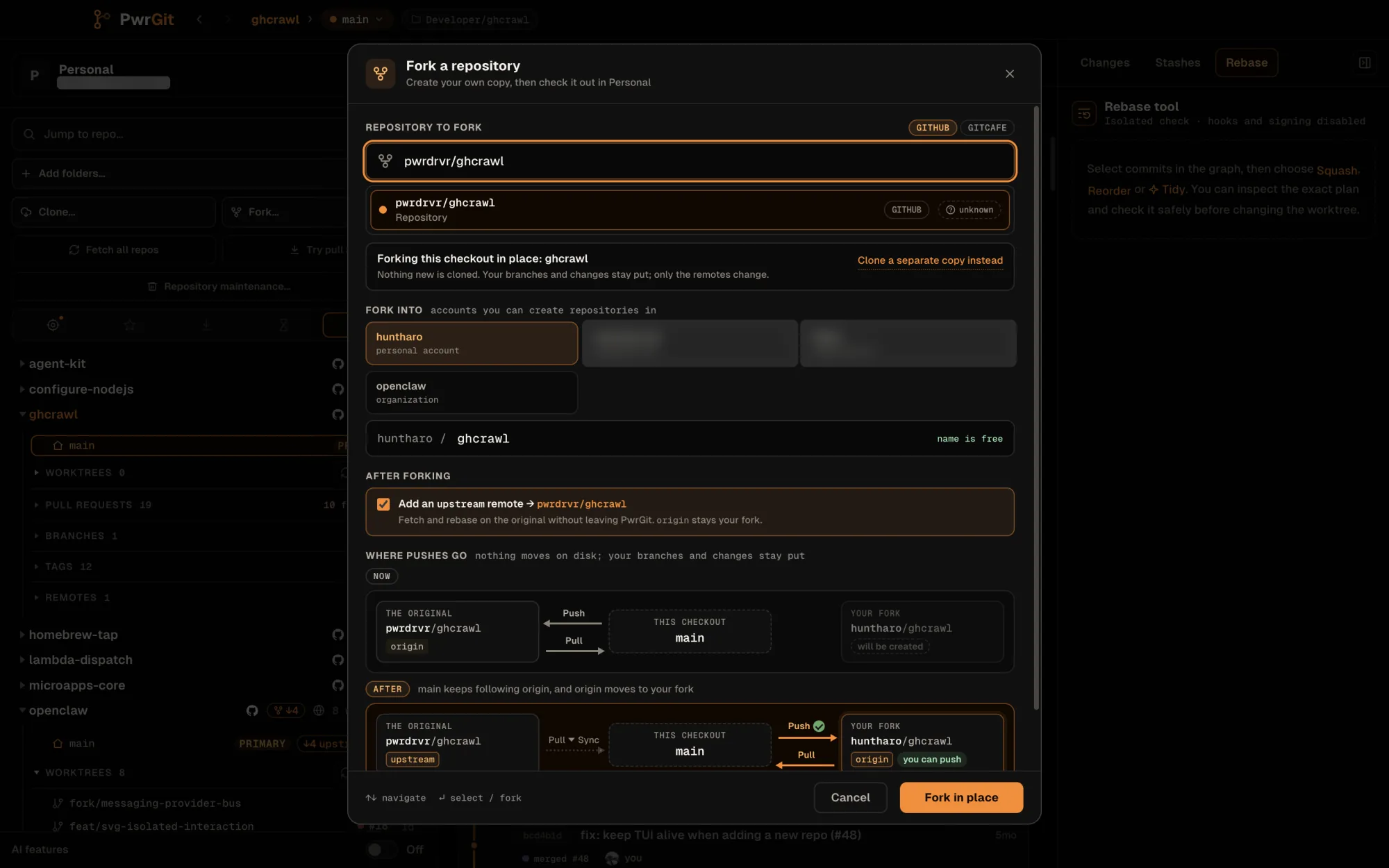
Fork in place, or a separate clone
Started from a checkout, Fork defaults to in place: “Nothing
new is cloned. Your branches and changes stay put; only the
remotes change.” origin moves to your fork and the original
is kept as upstream. Branches that tracked origin follow it
to the fork; no branch setting changes. The button reads Fork
in place, or Switch origin to my fork when your fork
already exists.
Clone a separate copy instead switches to a fresh clone of the fork, with Clone with and Check out to fields. The button reads Fork & clone, or Clone your fork when the fork exists. If your fork is already checked out somewhere, Reveal checkout shows it instead of making another.
Other choices in the dialog:
- Fork into — your account, or an organization (GitHub) or group (GitLab) you can create repositories in, and the fork’s name.
- Add an
upstreamremote — on by default. If the source is itself a fork, you choose whetherupstreampoints at the root repository (the usual answer), the intermediate parent, or the repository you picked. - Copy the default branch only — GitHub, separate clone only.
If upstream is already taken by another remote, PwrGit uses
upstream-2, upstream-3, and so on. A remote that already
points at the original is reused as it is.
Fork routes
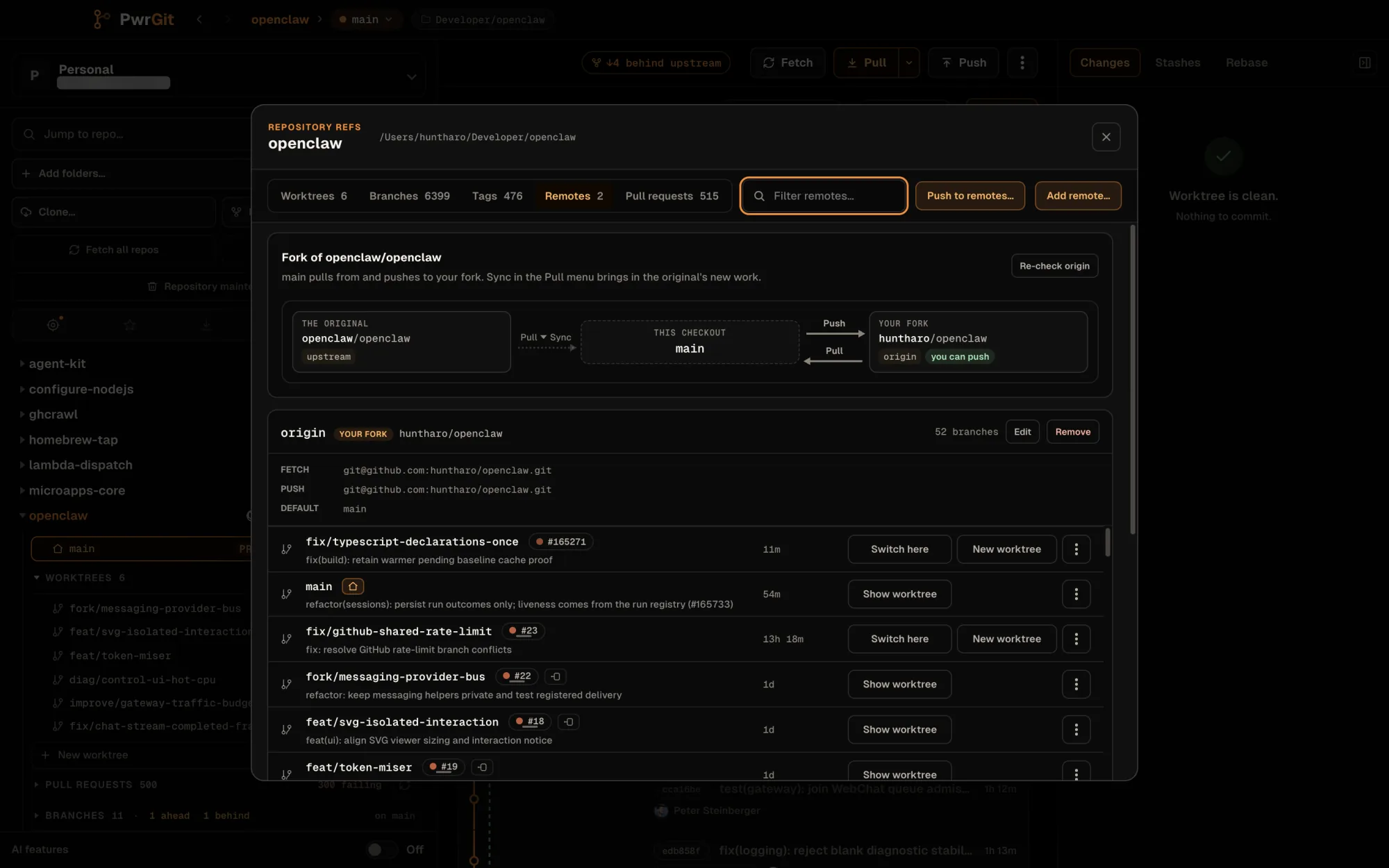
Wherever a change would move where a branch pulls from or pushes to, PwrGit draws the route first: The original, This checkout, Your fork, and arrows labelled Pull, Push or Pull ▸ Sync, with Now and After strips when something will change. Tags on each box say can’t push, you can push, or will be created. In Git terms expands to the exact remote or branch change.
Routes appear in:
- Fork… — “Where pushes go”, before and after.
- Publish — where a new branch will go, and whether you can push there.
- Remotes — the fork card: “branch pulls from and pushes to your fork”, or a warning that it still goes to the original.
- Pull — Sync with source, Pull source only and Pull tracked only, each with its route.
- Tracking repair — see below.
The fork’s parent remote
A repository cloned from a fork often has no remote for the
original, so PwrGit cannot show how far behind the fork is. When
the forge says origin is a fork and no remote points at its
parent, the Remotes tab shows Fork parent: owner/name
with Add upstream. It adds the remote and fetches it in one
step, and the parent’s changes then appear in fork status and
the Pull menu.
When upstream is already used for something else, the button
reads Set up parent remote… and offers Use another name
(default upstream-2) or Move current upstream to a new
name first.
PwrGit’s automatic remote checks also add the parent remote by the same naming rule, once the forge has confirmed it.
Read-only checkouts
When the forge says your account cannot push to origin, the
repository row and the worktree header show a read-only mark:
“You can’t push to owner/name. Fork it to contribute.” Click it
to fork in place. PwrGit draws the mark only when the forge said
so; a repository it never asked about shows nothing.
After a denied push
If a push is refused and you already have a writable fork, PwrGit opens Push to your fork instead:
- It shows the forge’s refusal, and the branch’s route Now and After.
- With more than one confirmed writable fork, Push to lists each with a you can push tag; pick one.
- “Only branch’s settings change. Your commits and files stay where they are, and nothing is pushed until you push.”
- Use my fork (or Use owner/name) sets the branch’s upstream to the fork.
Nothing is pushed by the repair. The confirmation toast — Now using your fork — carries a Push action to retry explicitly. If there is no fork yet, the Fork dialog opens instead, with Git’s error as the reason.
The same repair is offered from the Remotes fork card and the Pull menu as Use your fork for branch…, whenever a branch still tracks the original.
Clone your fork
Cloning a repository you can read but do not own offers two cards under Clone from:
- The original — with a read-only or can push tag.
- Your fork — checking…, will be created, on GitHub, checked out, or unavailable.
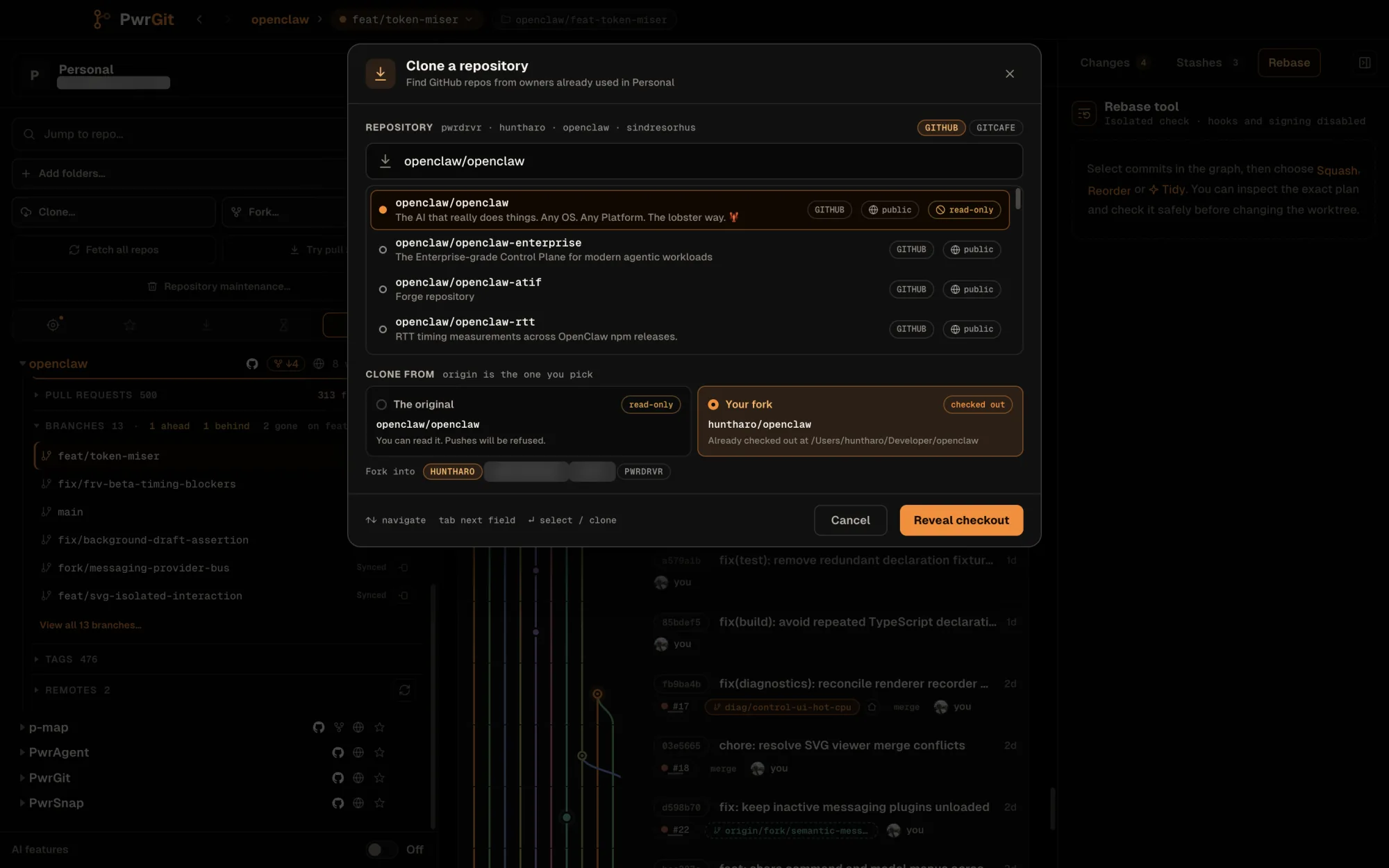
The original is the default unless you cannot push to it and your fork already exists. Creating a fork is never the default. The button follows the choice:
| Button | Does |
|---|---|
| Clone repository | Clones the original |
| Fork & clone | Creates your fork, then clones it |
| Clone your fork | Clones the fork you already have |
| Reveal checkout | Shows the checkout of your fork you already have |
A fork clone keeps the original as upstream, and the
destination line says so: “Will create path · upstream
owner/name”.
Troubleshooting
Settings → Forges is the first place to look. Each card names its state and, when blocked, the exact command that unblocks it under What to do.
| Symptom | Cause |
|---|---|
| No request chips anywhere | CLI not installed, or not signed in — check Settings → Forges |
| No forge features for one repository | origin is on a host PwrGit does not recognize. Sign the CLI in to it, or add it under Settings → Forges |
| “PwrGit doesn’t know which forge runs at that host” | Same — clone and fork refuse an unrecognized host rather than guess |
| “host is switched off in Settings → Forges” | That host’s switch is off |
| “Forge couldn’t access owner/name” | The repository name is wrong, or the CLI’s active account cannot see it. Forges answer 404 for private repositories you cannot access |
| Typing a name in Clone finds nothing on a company host | Search covers the hosted instances only. Paste the URL or owner/name |
| No visibility, fork or read-only mark | PwrGit has not read the repository yet. Refresh forge info in its menu |
| Visibility reads unknown | The forge would not say. Click the mark to retry, or check Logs |
| No avatar for a commit | The forge could not prove the account — see author avatars |
| Squash-merged branches not marked prunable | Needs a connected forge — git ancestry alone cannot see a squash merge |
| “GitCafe returned an invalid response” | Update cafe to 0.5.0 or newer |