
Sync
The worktree header carries the branch, its path, a status chip, and three buttons: Fetch, Pull, Push. On a narrow pane they collapse to icons. Nothing on this page merges a history you did not ask to merge, or force-pushes without showing you the exact ref and the commit it is leased on.
Fetch, Pull, Push
- Fetch runs
git fetch --prunefor the branch’s remote. On a fork it asks the fork’s source too, because only the source’s tip can say the fork has fallen behind — the receipt reads Fetched origin + upstream. - Pull fetches, then fast-forwards. It never merges. See Pull is fetch plus fast-forward.
- Push pushes the branch to the one it tracks. A branch with no upstream asks where to publish first — see Publish a new branch.
The status chip beside them says where you stand:
| Chip | Meaning |
|---|---|
| up to date | Level with the branch it tracks |
↑n ahead |
n local commits to push |
↓n behind |
n commits to pull (with · ↑n when both) |
| no upstream | The branch tracks nothing; Push will ask where to publish |
↑n local · no upstream |
No upstream, and n commits not on any fetched remote branch |
| upstream gone | The branch it tracked was deleted on the remote |
↓n behind upstream |
A fork’s source has n commits for this branch — see Forks |
Two more chips can sit to the left. main +n says the
default branch has n commits this branch does not — drift, not
commits to pull. read-only says the forge reports that your
account cannot push to this repository; clicking it offers the fork
dialog.
Operation status cards
Pressing Fetch, Pull or Push opens a status card under the button straight away — before Git has printed anything — and the card stays to become a readable receipt of what was done.
- It accumulates; it does not narrate. Each step the operation goes through gets one row — Fetching updates, Fast-forwarding, Reapplying your changes — and each row changes once, from present to past tense, when its work ends. Nothing is wiped, so nothing needs re-reading. Network steps carry a transfer meter. An operation that finishes in under a second shows one line and then its receipt.
- Successes close themselves after a short pause, with a draining bar along the bottom. The bar pauses while the pointer is over the card and stops for good if you click or focus inside it.
- Failures stay until you dismiss them, headlined with the reason Git gave — not Git’s first line, which is usually just the URL — with Logs and Copy (the status plus Git’s full output).
- Git’s own output sits in a collapsed Recent Git output section with the command that produced it. It opens itself when it is the finding: a failure, a cancel, or a network step that has gone quiet.
- Cancel stops a running fetch, pull or push. A cancel is reported as a cancel, not as an error.
A network step that has printed nothing for 20 seconds says so — Contacting the remote — no response for 20s, or no Git output for 1m 05s once a transfer has started and stalled. Fetch and push are obliged to report progress, so silence there is evidence; a wedged SSH agent or a credential helper waiting on a dialog nobody can see looks exactly like this. Local steps such as checkout are allowed to be quiet.
Escape, the card’s close button, or a click anywhere outside it dismisses the card; the click still lands where you aimed it. An operation against a repository you are not looking at — one started from the sidebar, a bulk run, or another window — gets a toast instead, once it has run for four seconds, naming the repository and remote with a link that reveals it in the sidebar.
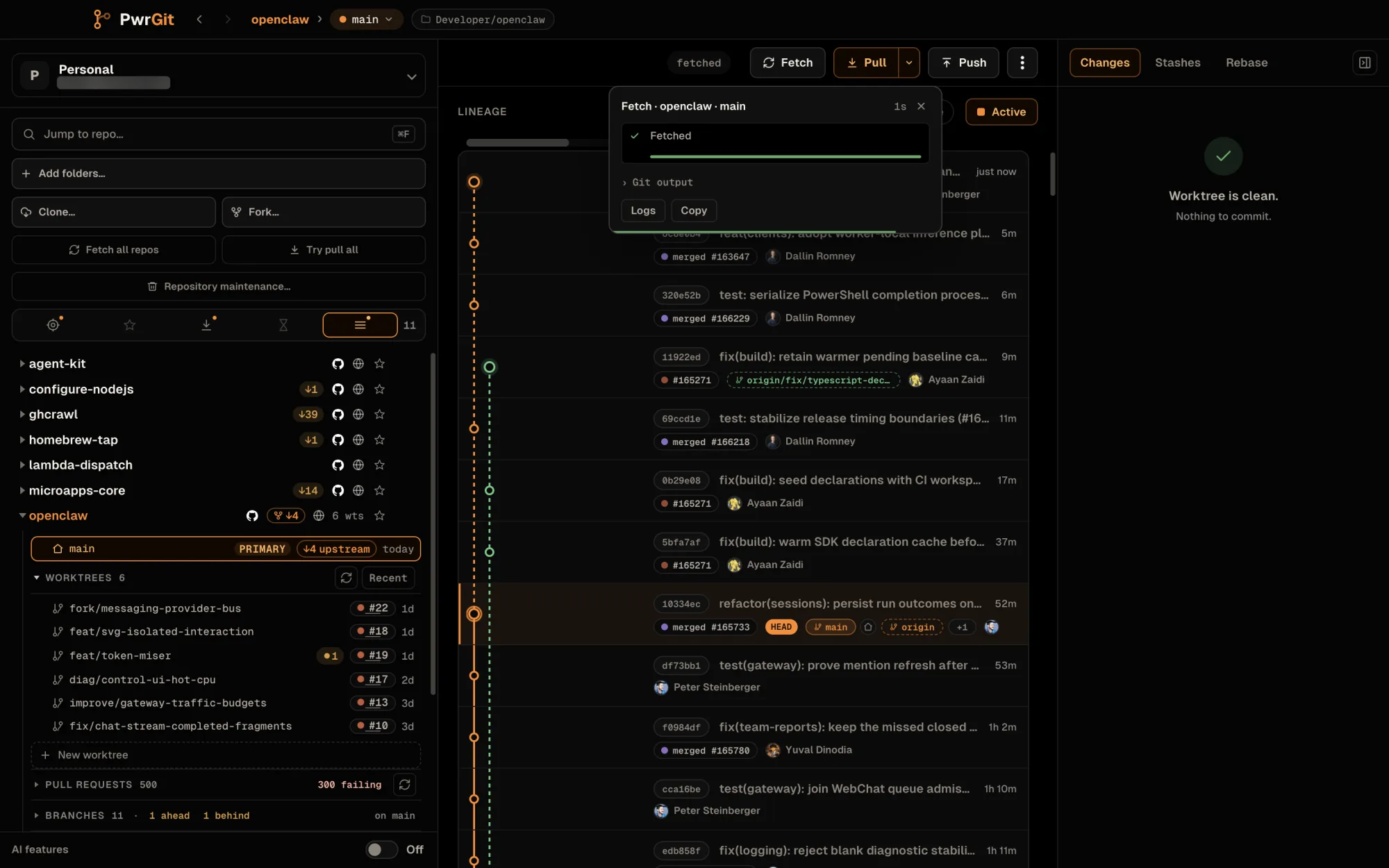
Remote status for every visible repository
The sidebar shows what each checkout would pull and push without
your selecting it. A worktree row carries ●n for uncommitted
changes, ↑n for commits to push, and a ↓n badge for
commits to pull — a solid badge when your own remote has them, an
outlined badge with a fork mark when a fork’s source does. A
branch whose upstream was deleted reads gone. The repository
row carries its primary checkout’s count, so a collapsed repository
still says it is behind.
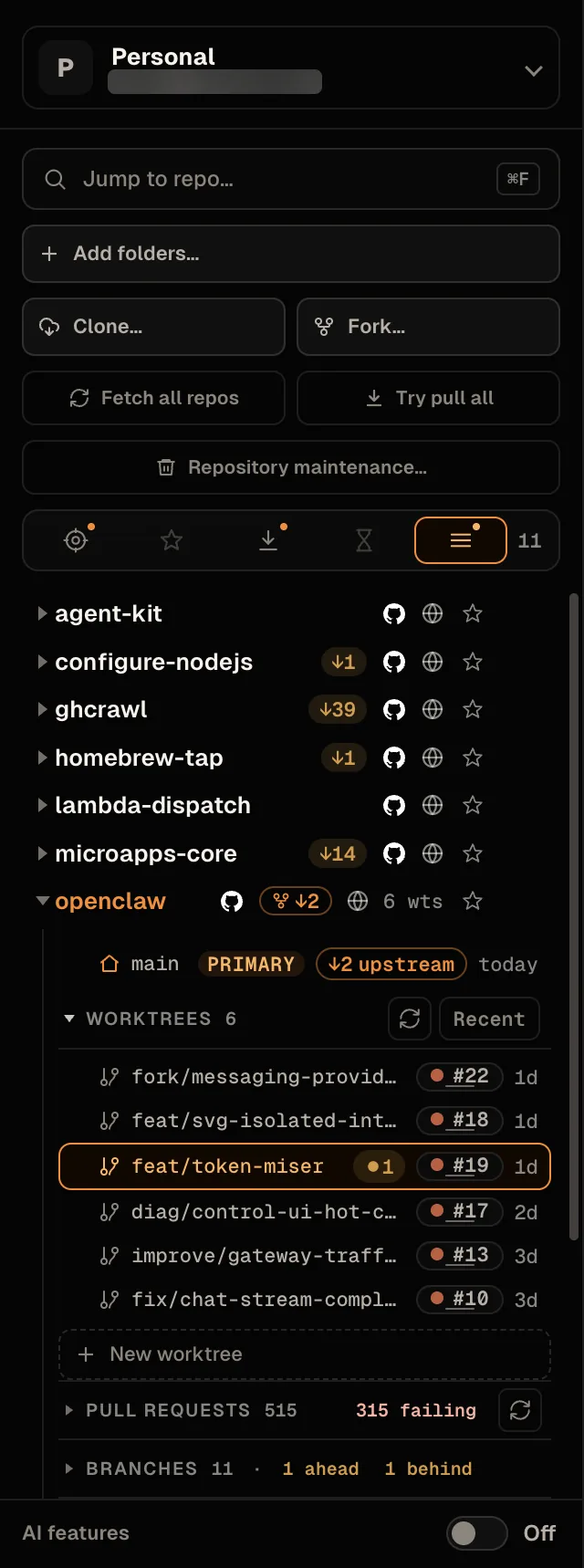
Those counts stay current through an automatic check that runs only for rows on screen, and only while a PwrGit window is focused:
- A row scrolling into view asks for a check after a half-second pause, so a fast scroll does not fire a check per row. Focusing the window asks again for everything visible.
- Each repository is checked at most once a minute. A round every few seconds decides which are due.
- One request per remote answers every checkout. Linked
worktrees share a repository, so their branches are batched:
PwrGit asks each remote for its branch tips once
(
git ls-remote --heads), compares them with the local remote-tracking refs, and fetches only the branches whose tip moved. A branch deleted on the remote has its stale ref removed, so it stops contributing counts. - Selecting a checkout, or resting the pointer on a row for three-quarters of a second, checks it at once.
- The check gives up after 12 seconds. If the network is unreachable, automatic checks pause for two minutes rather than retrying into the outage. Your own Fetch, Pull or Push always takes precedence: it cancels a check in flight rather than queueing behind it.
This check never shows a status card or locks the header’s buttons. On a checkout the forge reports as a fork, the first check also adds the parent repository as a remote if none points there yet, so the source’s counts can appear at all.
Pull is fetch plus fast-forward
Pull does not merge. It fetches, then fast-forwards. If the branch cannot be fast-forwarded, PwrGit stops and shows you why rather than creating a merge commit you did not request — see When the branch has diverged.
A pull with a dirty working tree still works. Local changes — tracked and untracked — are stashed, the fast-forward runs, and the stash is reapplied. The header names each phase as it goes:
- Fetching updates
- Preparing local changes
- Fast-forwarding and checking out files
- Reapplying local changes
- Finishing refresh
If reapplying hits a conflict, you are told, with the conflict markers left in the tree — it is not swallowed. If the pull fails after stashing, your work stays in the stash and PwrGit says so; the Stashes tab marks a stash left by an interrupted pull for recovery.
A pull that goes quiet is watched: a suspicious pause is flagged after two minutes, and a pull with no output at all for fifteen minutes is abandoned rather than hanging forever. No pull runs longer than an hour. That bounds a wedged credential helper or LFS filter without cutting off a genuinely large transfer.
Forks — pulling from the source
On a fork, the branch you track is your own copy — origin/main
reads up to date while the original repository is a hundred
commits ahead of both. So on a branch the fork’s source also
carries, the header compares against the source:
↓165 behind upstream, outlined with the fork mark, and
· ↑n when your branch has commits the source does not. Hover
the chip for the full sentence, including how your fork’s own
branch compares.
Pull then becomes a split button. The arrow beside it, More pull options, opens three choices, each drawn as a route from repository to repository:
| Choice | What Pull does |
|---|---|
Sync with upstream/main |
Fast-forward from the source, then push the same commits on to your fork. The default. |
Pull upstream/main only |
Fast-forward from the source. Your fork waits until you push. |
Pull origin/main only |
Your fork’s own tip — Pull as it is everywhere else. |
Picking a row runs it and remembers it for the repository; the button’s tooltip says what it will do next. Once the source has nothing new, Sync falls back to your fork’s branch, and the menu marks the choice that will actually run rather than the one you kept.
The push half of Sync is a fast-forward of your fork’s branch, leased on the tip PwrGit just fetched: if your fork’s branch moved in the meantime, or holds commits the source does not, it is not pushed, and the receipt says so and stays open. A sync that fast-forwarded but could not push reads pulled · not pushed or synced · push failed.
When your branch has commits of its own and the source has moved on, no fast-forward reaches the source. Pull stops for a review, and the menu leads with two actions:
- Rebase onto
upstream/main… — keeps your commits on top, then (for Sync) pushes the result to your fork, replacing what it holds, leased on the tip you reviewed. - Reset to
upstream/main… — your commits leave the branch; opens the reset review with the source selected.
If a branch still pulls from and pushes to the original although
your fork is set up — a remote rename carries tracking with it —
the menu offers Use your fork for <branch>… instead. It
shows the route before and after, and changes only that branch’s
upstream.
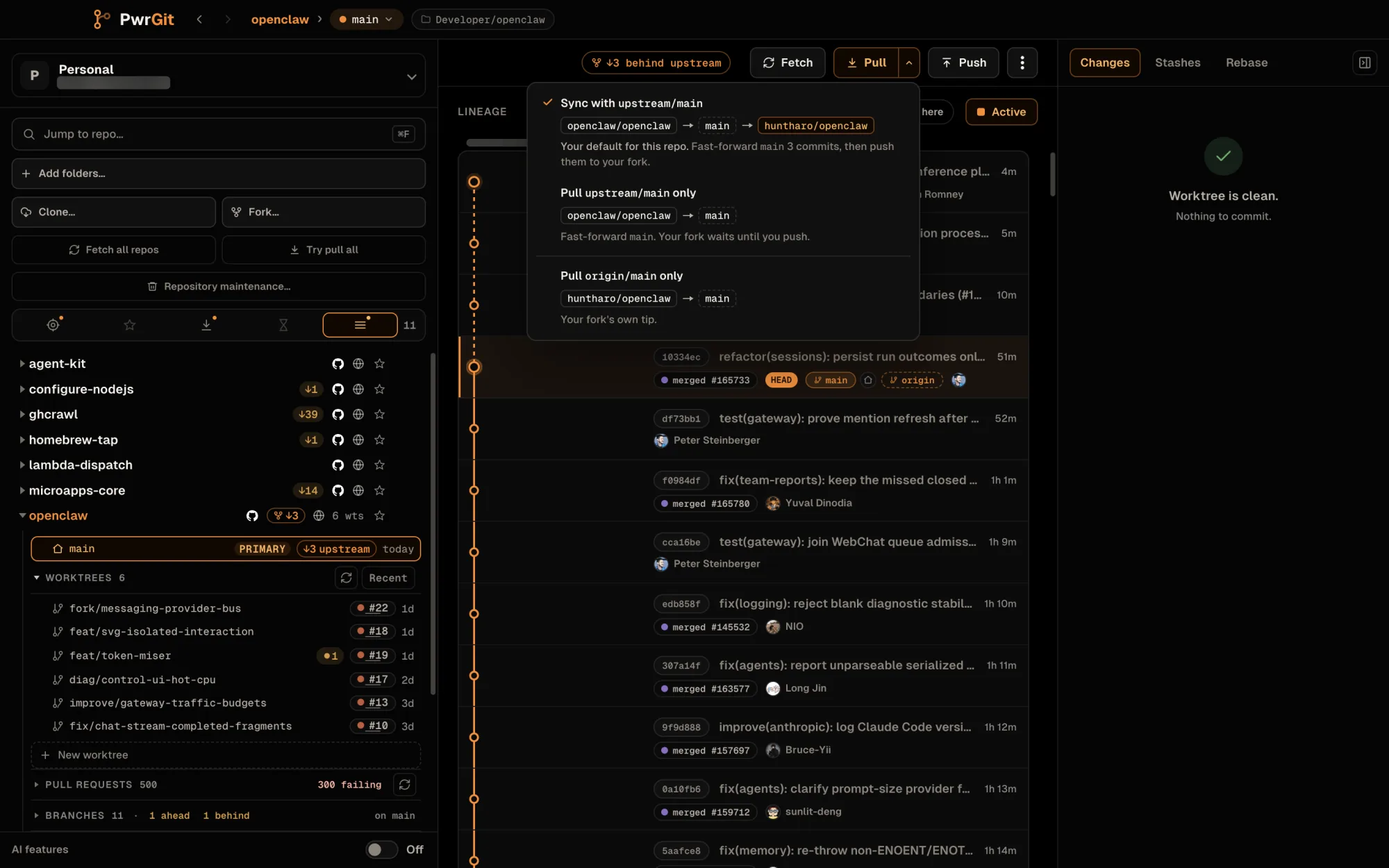
Fetch all repos and Try pull all
Two buttons under the sidebar act on every repository in the profile. Each opens a dialog that starts at once and owns its own progress; three repositories run at a time, and one failure never stops the rest.
- Fetch all repos fetches every configured remote of each
repository with
--prune, once per repository. Stale remote-tracking refs go; local branches are kept. - Try pull all updates only what is provably safe: clean, attached branches whose upstream is a fast-forward away. It never stashes, merges, rebases, resets or discards. Everything else is skipped with its reason — uncommitted changes, diverged, local branch ahead, no upstream, detached HEAD, Git operation in progress, authentication required.
The progress bar is coloured by outcome — success, partial, skipped, failed, cancelled — with in-flight and queued repositories at its end, and a legend that counts each. Beside it run the elapsed time and, after a few repositories have finished, a deliberately coarse estimate (about 2m left). Each repository’s card shows what it is doing now — which remote it is fetching, how many worktrees it has checked, or that it is waiting on another Git operation — and keeps a Completed tasks list. When the run ends, the summary stays: 12 worktrees updated, 30 already current, 4 safely skipped. Cancel finishes the Git command in flight and starts nothing new.
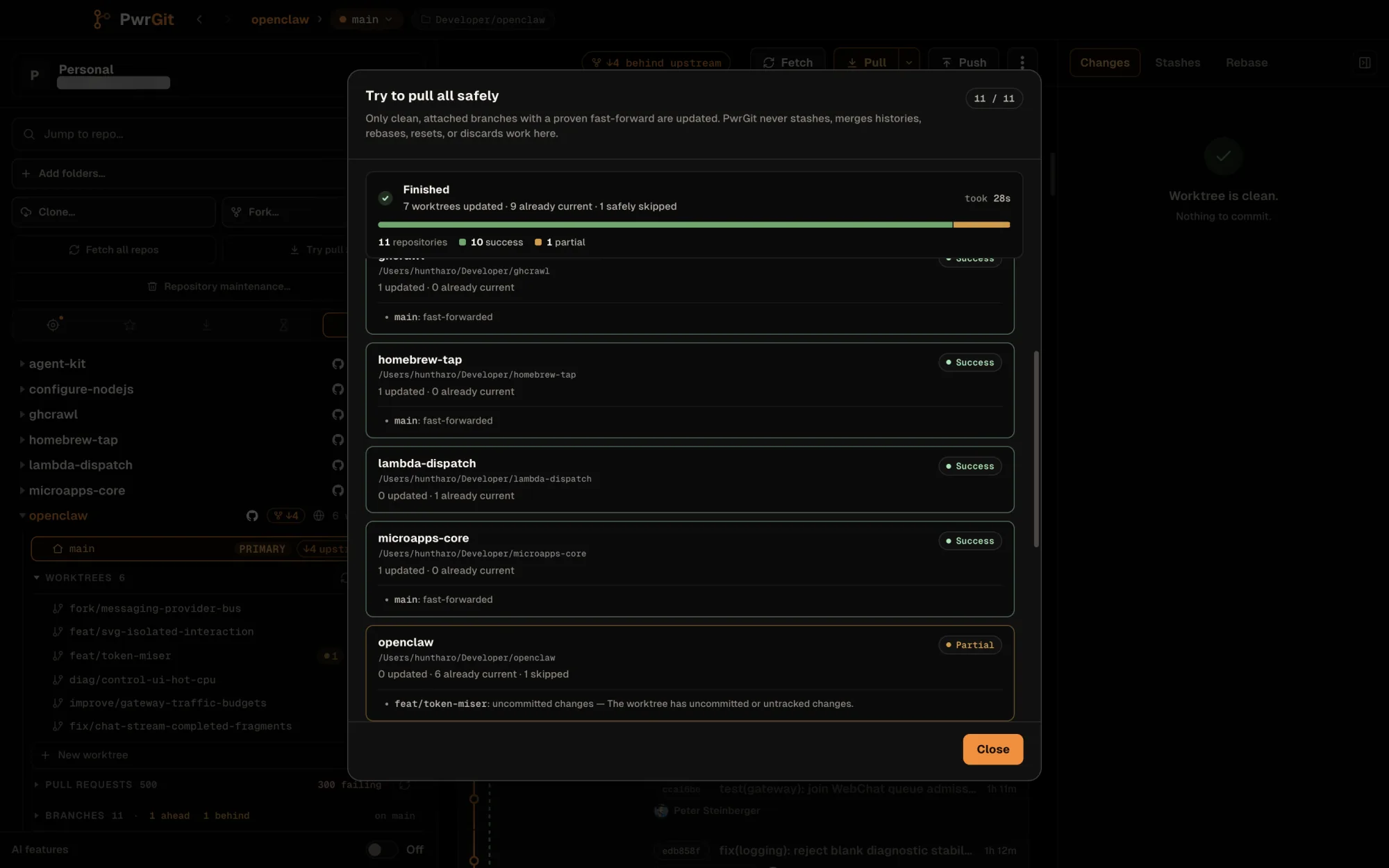
Publish a new branch
Push on a branch with no upstream does not run a push Git would
refuse. It asks Publish <branch> first: pick the remote, and
PwrGit pushes the branch under the same name and sets it as the
upstream, so Push and Pull work normally from then on. The branch
keeps its own name on the remote because Git’s default push mode
refuses a branch whose upstream is named differently.
When the forge has named the remotes, the dialog labels them —
Your fork, The original — marks each you can push or
can’t push, and draws where the branch will pull from and push
to afterwards. If the forge says you cannot push to the remote you
picked and you have no fork yet, the primary action becomes
Fork <repository>…, with Publish anyway beside it.
A push the remote refused
When a push is denied — the account cannot write to that repository — PwrGit treats Git’s refusal as the evidence and offers the remedy, whether or not the forge was ever asked about permissions.
You already have a fork here. The dialog reads Push to your
fork instead, quotes the forge’s refusal, and shows the branch’s
route now (pushing to the original) and after (pushing to your
fork). With several writable forks — an organisation’s and your
own — you pick one. Use my fork changes only that branch’s
upstream, the same as git branch --set-upstream-to; your commits
and files stay where they are, and nothing is pushed. The receipt
that follows, Now using your fork, carries a Push button:
the retry is explicit.
You have no fork yet. The dialog becomes the fork offer. It
previews the remote layout it will write — origin becomes your
fork, where pushes go; the original stays as upstream, to fetch
and rebase on — and offers Fork & switch origin. If the forge
already holds a fork of yours, the button reads Switch origin to
my fork instead and nothing new is created. Either way the
checkout’s files and branches are untouched, and origin is now
your fork is the only thing that changed. Press Push again when
you are ready.
When the branch has diverged
If the branch and its upstream each hold commits the other does not, PwrGit stops before changing either history and opens a dialog that shows you the situation: how many commits are local only, how many are remote only, and whether your working tree is clean.
It also lines the two histories up side by side. Where git can pair commits across them, it says so — matching subjects and identical +/− totals usually mean someone rebased or force-pushed, rather than that real work is about to be lost.
Two recovery actions:
- Rebase local commits — replay your local-only commits on the upstream. Keeps their changes where it can, and may stop for conflicts. On a fork it reads Rebase and push and then pushes the result to your fork, replacing what it holds — only if it is still at the commit the dialog names.
- Reset to remote… — discard the local-only commits and take the upstream’s tip, after a second confirmation. On a fork it reads Review reset… and opens the full reset review.
Neither is offered while the working tree is dirty. Commit, stash, or discard first. Reset to a different branch… opens the reset review with nothing preselected.
Reset a branch to its remote
Reset to remote branch…, from a worktree’s ⋯ menu, points the local branch at a fetched remote tip. It is a review, not a button:
- Target. Ranked suggestions — Fork source (or Upstream remote), Tracking, Default branch — or Another fetched branch… from a searchable list. A freshness line says when the snapshot was fetched and from which remotes, warns when a suggested target’s remote was not part of the last fetch, and offers Fetch for exactly the remotes in play. A reset uses the fetched snapshot, never the live remote.
- Your fork (fork source targets only). Optionally bring your
fork’s branch along: Update
origin/mainto match when that is a fast-forward, Force-push … to match when it is not — leased on the tip you reviewed. - Reset mode. Soft (the default) moves the branch and leaves the index and working tree alone; the changes of commits that leave the branch stay as differences against the new HEAD. Hard · destructive resets the index and tracked files too.
- Review. The exact refs and object IDs, the commits leaving and arriving aligned side by side, how many leaving commits have no counterpart on the target, and the push command verbatim. A reset that strands commits, discards working-tree changes, or force-pushes needs an I understand… acknowledgement first.
The reset stops if the checkout or the fetched ref changes between review and apply. If the fork push fails after the reset, the reset stands and the receipt says the fork branch is unchanged.
This is the right tool when a branch has drifted and you want the remote’s version, and the wrong one if you have work you have not pushed. Git’s reflog may keep discarded commits for a while; do not treat that as a backup.
HTTPS authentication failures
When a fetch, pull or push to github.com over HTTPS fails for want of a usable credential — or Git LFS does, during a pull’s checkout — PwrGit offers to try the same repository over SSH instead of leaving you at a credential prompt it cannot show.
Try this remote with SSH? lists the current address and its SSH
equivalent, and Test SSH connection checks read access over SSH
without fetching or changing anything. It runs SSH in batch mode,
so it never prompts, but your ~/.ssh/config, agent identities and
host aliases still apply. Only after a successful test does it offer
Change origin to SSH. Changing the remote changes the address
Git uses for both fetch and push, and PwrGit says so first; a
separately configured push URL is left alone. The read test does
not prove push permission, and PwrGit does not retry the operation
for you.
Other hosts, and remotes that already use SSH, are not offered this; see Git runtime for how the bundled Git finds credentials.
Push to other remotes
Beyond the header’s Push, the refs browser’s Push to remotes… pushes a chosen local branch to a chosen branch name on one or more remotes. Review push fetches every destination first, then names the relationship at each one:
| Relation | Meaning |
|---|---|
| Will create | The destination branch does not exist yet |
| Up to date | Nothing to send |
| Fast-forward | The destination advances cleanly |
| Destination ahead | The destination has commits you do not |
| Diverged | Both sides have commits the other lacks |
The first three are safe. The last two are not, and block the push until you uncheck those destinations and review again — a push there would need to overwrite something. The push itself is leased on the tips the review saw, and the dialog keeps a per-destination result table.
Git LFS
The bundled Git includes Git LFS with its filters configured, so LFS repositories check out real file contents with no setup — see Git runtime.
If a repository needs LFS and the Git in use cannot run it, or its filters are not configured (most often with an installed Git selected in Settings), PwrGit says so in place rather than letting the checkout produce pointer files that look like corrupted content: a Git LFS setup needed notice with Copy commands to fix it, and a header chip that checks again when clicked. Once LFS works, a Git LFS ready notice confirms it.
When something fails quietly — Logs
Help → Logs, or Command+Shift+L (Ctrl+Shift+L), opens the Logs window. Failure cards and error toasts link to it.
This is the escape hatch for anything that fails without a visible cause: a fetch that returns nothing, a push rejected by a hook, a credential helper that never answers. The window shows what PwrGit ran and what Git said back, filterable by level (Error, Warning, Info, Debug) and searchable with Find in logs. Follow keeps it scrolled to the newest line.
The same log is written to main.log, whose path the window shows
with Copy and Reveal. It lives in ~/Library/Logs/PwrGit/
on macOS and in the logs folder of the application data folder
on Windows and Linux — see Uninstall.
Not yet
- HTTPS-to-SSH recovery is github.com only. GitLab, GitHub Enterprise and other hosts get the failure and its Logs entry, but no offer to switch.
- Pull never merges. A branch that cannot fast-forward needs a rebase or a reset from the divergence dialog; there is no merge-commit option.